Affiliate Disclosure: This article contains affiliate links. If you purchase through our links, we may earn a small commission at no extra cost to you.
AirTag for car tracking works well in two specific situations: finding your parked car across a large lot, and getting a last-known location after theft. AirTag 2's new 60-meter Precision Finding range and 30% wider Bluetooth detection make both more reliable than before. What it can't do: real-time tracking, speed monitoring, geofencing, or reliable updates in rural areas. Those require a dedicated GPS tracker with a monthly plan. And tracking someone else's car with an AirTag is a criminal offense in most US states.
Most people either overestimate what AirTag can do for a car, or dismiss it entirely. The truth is more specific. I've tested AirTag in several vehicles across different scenarios: urban parking garages, highway theft, rural storage. The results depend almost entirely on where you are and what you're trying to do. This guide covers what actually works, where to hide one, and when you should spend money on a real GPS tracker instead.
- AirTag 2's 60-meter Precision Finding range makes finding your car across a parking garage floor genuinely reliable on iPhone 11 or later — this is its single best vehicle use case.
- The best hidden spots are behind the rear brake light panel (hardest to find, full signal through plastic) and under the rear seat (invisible without a physical search, easy battery access).
- Tracking someone else's car without consent is a criminal offense in 40+ US states, with penalties ranging from misdemeanors to up to 15 years in prison depending on the state.
- AirTag cannot provide real-time tracking, speed data, geofencing, or route history — for those features you need a cellular GPS tracker like Bouncie ($8/month).
- Denver's DenverTrack program distributing free AirTags to residents contributed to a 33% drop in auto theft in 2025 — in high-iPhone-density cities, the technology has a real track record.
What AirTag 2 Actually Changed for Cars
Apple released AirTag 2 in January 2026, and three upgrades matter specifically for vehicle use.
Precision Finding now reaches 60 meters, up from about 15 meters on the original. In practice, that means you can use the AR arrow to locate your car from across an entire level of a parking garage, not just from the same row. On iPhone 11 or later, this works reliably. It's the best use case for AirTag in a car context, and the range jump makes it noticeably more useful.
The Bluetooth detection radius also widened by roughly 30%. This is the passive mode: nearby iPhones picking up your AirTag's signal and relaying the location to you. In dense cities (airports, downtown parking, shopping centers), this means more frequent location pings if your car is moved. The difference isn't dramatic, but it matters after a theft when every data point helps.
The speaker is 50% louder. Useful if you're scanning a dark parking structure. Also means an unauthorized AirTag placed on your car will beep more audibly when it triggers its anti-stalking alert. Our full AirTag 2 review has the spec breakdown in detail.
What didn't change: no GPS, no cellular, no real-time tracking. AirTag still depends entirely on other people's iPhones to relay its location. Zero subscription cost is the trade-off for this architecture. In iPhone-dense areas, updates can come every few minutes. In rural areas, you might wait hours. Or get nothing.
The Best Places to Hide an AirTag in Your Car
Placement is everything. Not just for concealment, but for signal strength. Metal kills Bluetooth, and some spots that look smart actually cut your range to almost nothing.
Under the Rear Seat — My Top Pick
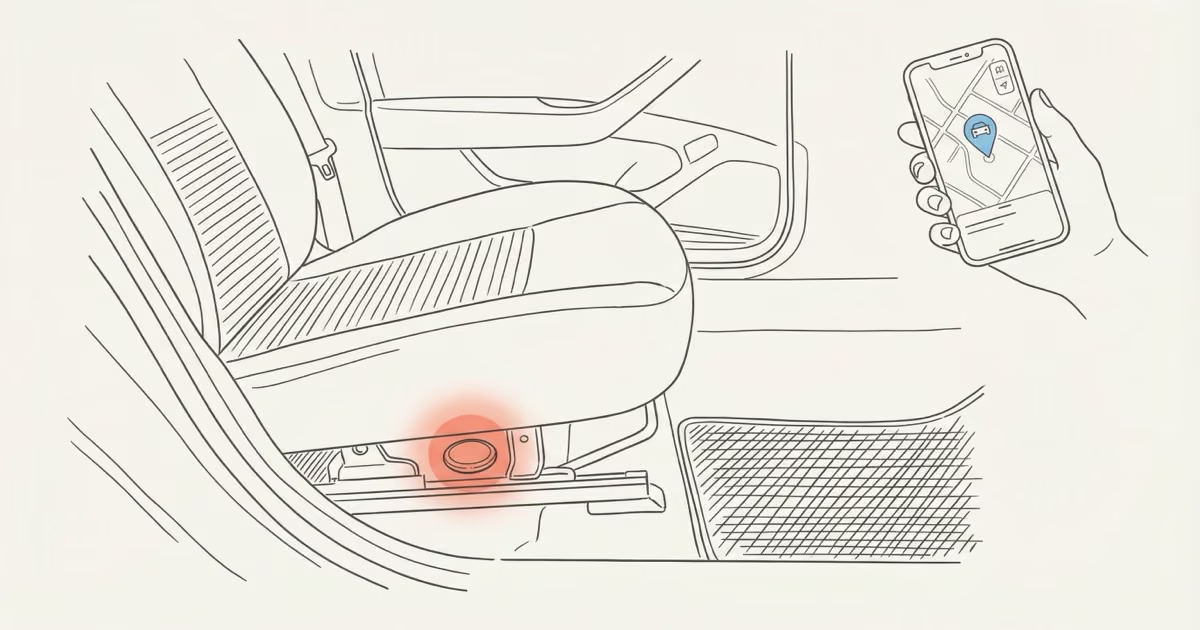
This is where I put mine. The seat fabric doesn't block Bluetooth at all, it's completely invisible without physically searching the interior, and the seat bracket usually has a metal rail you can attach a magnetic mount to directly. The main risk is accidental damage when someone adjusts the seat all the way back. A ruggedized magnetic mount case handles this; the screw-on lid keeps the AirTag from popping out during hard stops or even rough roads. Battery access requires reaching under the seat, which takes about 20 seconds once a year or so.
Behind the Rear Brake Light Panel (Trunk)
Arguably the best hiding spot if you don't mind a 10-minute installation. The plastic housing of most tail light assemblies lets Bluetooth pass through with no measurable signal loss. You're completely hidden from anyone searching the interior or the exterior. Remove the panel, tuck a magnetic case against the interior body panel, replace the cover.
Battery access means removing the panel again, which is the only real downside. But for theft recovery specifically, this is the hardest spot for a thief to find quickly. AirTag's beep doesn't trigger for 8 to 24 hours after owner separation, giving you a window before a smart thief even starts searching.
OBD-II Port Area / Center Console
Easy access. Good signal. Not particularly hidden; anyone who knows about AirTags will check the console area. Use this if convenience matters more than concealment, or as a second AirTag alongside a better-hidden one.
Spare Tire Well
Cooler temperature than most locations (good for battery life), completely out of sight, and most thieves won't pop the trunk floor during a quick theft. Signal can vary depending on how much metal surrounds the spare, but in most cars it passes through adequately. Worth testing with your specific vehicle before committing.
Wheel Wells and the Exterior Undercarriage — Avoid Both
Wheel wells are a bad idea. The metal surrounding the wheel assembly absorbs the Bluetooth signal and testing consistently shows degraded or unreliable location updates. You'll also lose it the first time you get a hard car wash.
There's a bigger problem with exterior magnetic placement: car theft rings use exterior-mounted AirTags to scout vehicles. The method is simple: tag a target car in a parking lot, track it home via Find My, steal it later. If you find an AirTag magnetically attached to your wheel well or bumper that you didn't put there, treat it seriously: document it, report it to police, and follow Apple's instructions to disable it. Our guide on finding a hidden AirTag in your car walks through the detection process step by step.
AirTag Car Mounts Worth Buying
The round disc shape of AirTag isn't designed to wedge into tight spaces on its own. You need a mount.
Elevation Lab TagVault Magnetic
The TagVault Magnetic ($16.95) is the one I actually use. The Neodymium magnet is strong enough to stay put through hard acceleration, speed bumps, and car wash cycles. The screw-on lid (think: a contact lens case) is IP68 waterproof, which matters if you're mounting anywhere with humidity exposure. It works with both AirTag gen 1 and AirTag 2. Single pack is the right call for one car; the 4-pack makes sense for households with multiple vehicles.
Budget Magnetic Case (8-12 Dollar Options)
For non-metal surfaces (plastic panels, fabric pockets, the area behind the glove box), you need adhesive backing rather than magnet-only. Several sub-$12 options on Amazon include both a magnetic base and 3M tape. The quality varies, so check reviews on waterproof sealing specifically before buying. The seal matters; a failed case in a humid trunk will kill the battery contact over time.
And if you haven't bought an AirTag 2 yet:
Is it legal to put an AirTag on a car?
On your own car: yes, no restrictions. The car is your property.
On someone else's car without their knowledge: illegal in most US states, and the laws tightened significantly in 2025. Texas Penal Code Section 16.06 makes it a Class A misdemeanor (up to a year in jail and a $4,000 fine) to install a tracking device on a vehicle you don't own. Florida's 2025 law pushes that to up to 15 years in prison if the tracker is used in connection with stalking, robbery, or other violent crimes. Pennsylvania passed a bill in 2025 specifically targeting tracker-based stalking. The NCSL tracks 40+ states with active tracking device statutes.
Grey area: tracking a spouse's car, even a jointly owned one, has been successfully prosecuted under stalking statutes in several states when the intent was monitoring and control rather than legitimate security. If that's your situation, talk to a lawyer first.
Anti-Stalking Alerts: What Triggers and When
AirTag's built-in protections are worth understanding from both sides.
If an AirTag that doesn't belong to you travels with you for several hours, your iPhone automatically shows a "Moving with you" notification. You can tap it to play a sound, see approximate location history, and get instructions to disable the device. This alert fires whether the AirTag is in a bag or on a car you're riding in.
Separately, AirTag beeps on its own after 8 to 24 hours of separation from its owner. No phone needed. AirTag 2's louder speaker makes this more audible from inside a car. A thief who doesn't know to check for AirTags will eventually hear it.
For Android users: iPhones handle this automatically. Android users need to actively scan with the Google Play "Tracker Detect" app or use Google Find Hub's cross-platform detection. It's not passive like iPhone alerts, but it works. Our guide on what the "AirTag found moving with you" alert means explains the timeline in detail.
One thing that trips people up: if you put an AirTag on your own car and then drive a family member with a different Apple ID, they'll get an unknown tracker alert. Fix this by adding family members through Family Sharing in the Find My app.
AirTag vs. a Real GPS Tracker: Be Honest About What You Need
This is the most important question. The two technologies are fundamentally different, and confusing them leads to real disappointment.
| Feature | AirTag 2 | GPS Tracker (e.g., Bouncie) |
|---|---|---|
| Technology | Bluetooth, crowd-sourced via iPhones | Cellular 4G LTE + satellite GPS |
| Real-time tracking | No — sporadic updates only | Yes — every 10-30 seconds |
| Speed data | None | Yes, with alerts |
| Route history | None | Full trip log |
| Geofencing | No | Yes, with boundary alerts |
| Rural coverage | Limited — needs nearby iPhones | Works anywhere with cell service |
| Monthly cost | $0 | $10-25/month |
| Device cost | $29 | $30-80 |
| Annual total | ~$29 | ~$150-380 |
My take: AirTag is the right call if you primarily want a free theft backstop for an urban vehicle or you want to find your car in parking lots. The $0 subscription makes it an easy supplemental layer. You're not choosing AirTag instead of good insurance; you're adding it on top.
You need a GPS tracker if you're monitoring a teen driver (AirTag has no speed data, no routes, no geofencing — it's completely useless for this), managing any kind of fleet, or if your car is often in rural areas where iPhone coverage is sparse. See our AirTag vs. GPS tracker comparison for the full breakdown.
The best option for most families who want real tracking: Bouncie. It plugs into the OBD-II port (no installation required), runs $8/month after a one-time device cost, and provides real-time location, speed alerts, trip history, and geofencing. It's what I'd use if I had a teenager with a car.
Also worth considering: running both. An AirTag in a hidden spot costs $29 once and adds a secondary tracking layer that doesn't depend on cellular networks. A Bouncie handles real-time. The combination is harder to defeat than either alone. Our guide to cheapest ways to GPS track a car covers the math in detail.
AirTag and Car Theft: What Actually Happens
The honest version: AirTag helps in some theft scenarios, fails completely in others.
In March 2026, AppleInsider reported an AirTag helping police recover a stolen car in Florida and catch the thief. The Dallas Police Department used a hidden AirTag in a stolen pickup to locate and surveil an active chop shop, recovering multiple vehicles. The NYPD, Arvada PD, and Denver PD have all launched programs distributing free AirTags to residents as theft deterrents. 9NEWS Denver reported that Denver's auto theft rate dropped 33% in 2025 compared to 2024 after their DenverTrack program expanded.
That said, the best-case scenario requires a few things to align: your car needs to move through an area with decent iPhone density, the thief needs to not immediately take it to an enclosed garage, and police need to be responsive when you share the location. Those conditions hold in cities. They don't reliably hold in suburbs or rural areas.
Chop shops are the other failure mode. A car that goes straight into a closed garage stops updating. A knowledgeable thief who finds the AirTag can remove the battery. This is why a deeply hidden AirTag (rear brake light panel, not center console) matters for theft scenarios specifically. The 8-to-24-hour beep delay gives you time to act on location data before the device is discovered.
For more on how AirTag accuracy affects these scenarios, see how accurate AirTags really are. The short answer: accurate enough for a neighborhood, not accurate enough for a specific street address.
Who Should Use AirTag for a Car (and Who Shouldn't)
AirTag 2 is excellent here. The 60-meter Precision Finding range covers most parking garage floors, and the AR arrow works reliably on iPhone 11 or later. This is arguably AirTag's single best vehicle use case.
Good fit. Free, subscription-free, and in cities with dense iPhone coverage you'll get enough location pings to help police. Pair it with car insurance and a hidden placement. Don't rely on it alone.
Wrong tool. AirTag has no speed data, no route history, no geofencing, no movement alerts. Use Bouncie or a similar OBD-II GPS tracker instead. The difference is significant.
AirTag doesn't scale to fleet management. You need real-time location, driver behavior data, and route logging. AirTag could serve as an inexpensive backup on rarely used spare vehicles. That's about it.
Use a cellular GPS tracker. AirTag updates in rural areas can be hours apart, or stop entirely. The technology depends on other iPhones being nearby. In low-density areas, that dependency is a dealbreaker.
Great fit. Set up Family Sharing in Find My so all household members see the car's location without triggering false stalking alerts. Zero subscription, works in most urban and suburban environments.
The Bottom Line
AirTag for car tracking works exactly as well as the iPhone density around your car allows. In cities, it's a useful and free theft backstop and parking locator. The AirTag 2 upgrades (60-meter UWB range, wider Bluetooth detection) make it noticeably better than gen 1 for both use cases. Buy one, hide it well, and treat it as a free supplemental layer on top of good insurance.
If you need real-time tracking, speed monitoring, or geofencing, AirTag isn't the answer. Bouncie is. The two run alongside each other without conflict, and for a car you actually care about, the combination is hard to beat.
For more on what AirTag can do beyond vehicles, see our best uses for AirTag roundup.
Frequently Asked Questions
Can AirTag track a car in real time?
No. Location updates only happen when a nearby iPhone passively detects your AirTag's Bluetooth signal and relays it to Find My. In dense cities, that can feel close to real-time. In rural areas or enclosed spaces like a garage, updates can be hours apart or stop entirely. For continuous real-time tracking, you need a cellular GPS device with a monthly plan.
Is it legal to put an AirTag on someone else's car?
Illegal in most US states. Texas, Florida, Pennsylvania, and 40+ others have statutes specifically covering unauthorized tracking devices on vehicles. Penalties range from misdemeanors to up to 15 years in prison depending on the state and intent. Even without a specific tracker statute, prosecutors have charged this under general stalking laws. Only place trackers on vehicles you own or have explicit written permission to track.
Where is the best hidden spot for an AirTag in a car?
Behind the rear brake light panel in the trunk is the hardest to find quickly and maintains full signal through the plastic housing. Under the rear seat is a close second: invisible without a physical search, good signal through fabric, and easier battery access. Avoid wheel wells (metal kills Bluetooth signal) and exterior magnetic placement (theft rings use exterior AirTags to scout targets).
Will an AirTag drain my car's battery?
No. AirTag runs on its own CR2032 coin cell, rated about two years. It has no connection to the vehicle's electrical system whatsoever. It's a self-contained passive Bluetooth device. Leaving it in your car indefinitely won't affect the car's battery at all.
Can thieves disable an AirTag?
Yes, if they find it. Remove the battery and it's dead. This is the strongest argument for a deeply hidden placement: the rear brake light panel or behind trunk lining rather than the center console. The AirTag 2's anti-stalking beep doesn't trigger for 8 to 24 hours, which means in many theft scenarios police can act on location data before a thief even thinks to search. A dedicated explainer on AirTag theft resistance covers the different defeat methods in detail.
Will my passengers get an AirTag alert while riding in my car?
Potentially, yes. If a passenger has an iPhone and isn't on your Family Sharing plan, they may get an "Unknown AirTag Traveling With You" notification after a few hours. For family members: add them through Family Sharing in Find My and they won't get false alerts. For occasional passengers like ride-shares, the alert is working exactly as intended: they'd know a tracker is present, which is Apple's privacy design.
Does AirTag work with Android phones for car tracking?
For tracking your own car: no. AirTag requires an iPhone to view location. Android users should look at Samsung SmartTag 2 (Galaxy ecosystem) or Chipolo ONE Point (works with Google Find Hub on any Android). For detecting an unknown AirTag on a car you're riding in: Android users can use the Google Play "Tracker Detect" app or Google Find Hub's built-in cross-platform detection. It requires manual scanning rather than automatic alerts.
AirTag 2 released January 2026; specs per Apple's newsroom announcement. Legal information reflects publicly available state statutes as of early 2026; consult a local attorney for jurisdiction-specific advice. Denver auto theft statistics from DenverTrack program reporting and CBS Colorado. Safety warning based on documented incidents; always involve law enforcement in vehicle recovery. Prices subject to change.