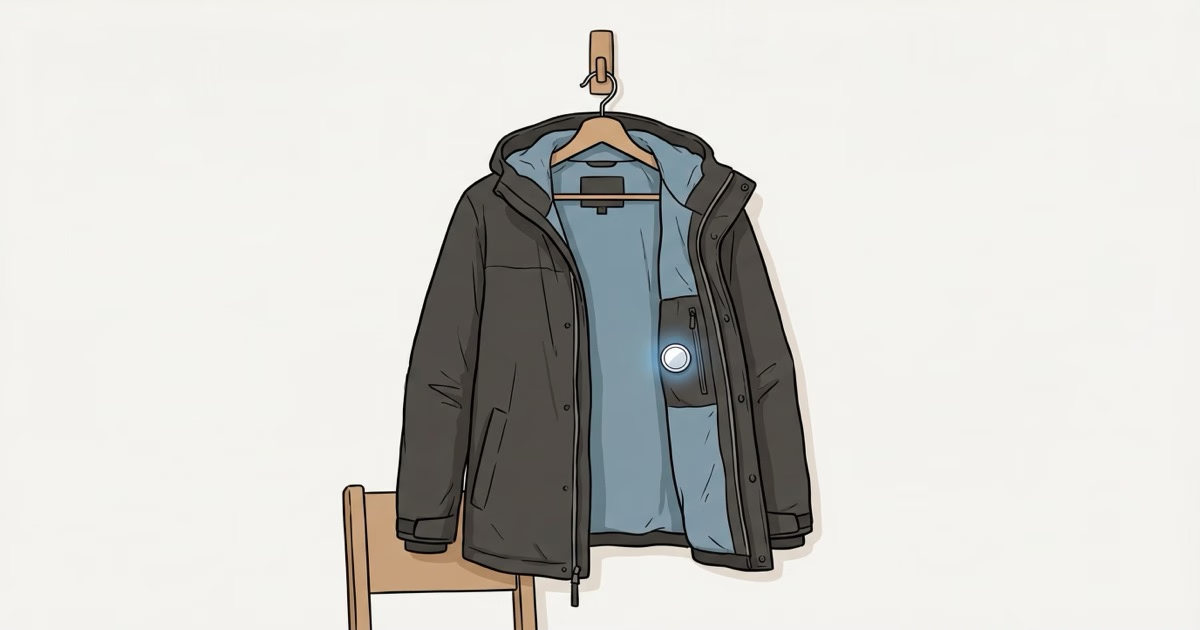
Jackets are one of those things you don't think about until they're gone. Left at a restaurant. Taken off the back of a chair. Walked off with at coat check. In cities like DC and Chicago, Canada Goose and North Face jacket theft has gotten bad enough that police departments have started telling people to use AirTags.
An AirTag won't stop someone from taking your jacket. But it gives you a shot at getting it back, and the "Left Behind" alert can catch you before you've driven 20 minutes away from the restaurant where you left it draped over a chair.
Where to Put It
You want somewhere the AirTag won't shift around, won't fall out when you shake the jacket, and won't create a visible lump. Four options, ranked.
1. Interior Zippered Pocket
If your jacket has one, this is the answer. Drop the AirTag in, zip it shut, done. No accessories needed. Most winter coats, ski jackets, and travel jackets have at least one internal zip pocket. The AirTag sits flat against your body and you'll never notice it. I've left one in a shell jacket for months and forgotten it was there until the battery warning popped up.
2. Sewn Into the Lining
For jackets without zippered pockets, you can sew a small fabric pouch into the lining near the collar or armpit seam. Takes about five minutes with a needle and thread. The collar area works best because it's the thickest part of most jackets, so the AirTag's 8mm profile disappears completely. This is the method most parents use for kids' school coats.
3. Adhesive Fabric Mount
The Elevation Lab TagVault Fabric sticks directly to the inner lining. It's a thin pouch with industrial adhesive backing that bonds to nylon, polyester, GORE-TEX, and vinyl. Peel, stick, snap the AirTag in. Clean install, no sewing. One catch: it does not stick to stretchy fabrics, leather, or suede. If your jacket lining is a slick mesh or elastane blend, it won't hold. For more attachment options, the AirTag holders and accessories guide covers what's available.
4. Safety Pin Mount
The TagVault Dual Safety Pin holder pins directly through the fabric. Two pins keep it from spinning. Best option for kids' coats where you want to move the AirTag between jackets as seasons change. Unpin, reattach, done.
Will It Survive the Washing Machine?
Probably. AirTag is IP67 rated (1 meter underwater for 30 minutes), and a washing machine cycle technically exceeds both the time limit and adds detergent and mechanical tumbling that Apple doesn't test for. But in practice, AirTags survive accidental washes all the time. Intego ran a full 40°C wash cycle plus tumble dryer and the AirTag came through fine.
That said, don't make it a habit. One accidental wash won't kill it. Running it through weekly will eventually compromise the water seals. Check pockets before washing. If you're using a sewn-in or adhesive mount, the AirTag stays in the jacket permanently, so hand-wash or use a garment bag for that area. For more on water resistance limits, the AirTag water guide covers the full IP67 breakdown.
The "Left Behind" Alert
This is the feature that makes a jacket AirTag useful day-to-day, not just for theft. In Find My, go to your AirTag and enable "Notify When Left Behind" (Apple's setup instructions). When your iPhone moves away from the jacket and the AirTag stays behind, you get a notification.
Two things to know. First, the alert takes 10-20 minutes to trigger. Apple builds in a delay to avoid false alarms. If you leave your jacket at a coffee shop and drive away, you might be a few miles down the road before the notification arrives. Second, set your home as a Trusted Location so you don't get pinged every time you hang the jacket on a hook and walk into another room.
The delay means this works better for sit-down situations (restaurants, airports, offices) than for grab-and-go spots. If someone lifts your jacket from a bar stool and walks out, the alert might not arrive until they're around the corner. But you'll still get a last-known location in Find My, and if they're within the Precision Finding range (about 30-45 feet with AirTag 2), you can walk right to it.
Comfort and Bulk
Not an issue. At all. Apple's AirTag 2 spec page lists the dimensions at 31.9mm across and 8mm thick, roughly two stacked quarters. In a jacket pocket or sewn into the lining, you will not feel it. AirTag 2 weighs 0.8g more than Gen 1 (11.8g vs 11g). Completely imperceptible.
This is different from wallets, where 8mm is too thick for a card slot and creates a noticeable bulge. Jackets have enough material and padding that the AirTag vanishes. Even in a thin windbreaker, it sits flat against the fabric without any visible bump from the outside.
What About Theft?
An AirTag won't physically stop a theft. What it does:
- Passive location tracking via Find My network. Any iPhone that passes near your jacket pings its location back to you. In urban areas, this updates frequently.
- The "Left Behind" alert if someone grabs your jacket while you're still nearby.
- Lost Mode lets you display your phone number on the AirTag. If whoever took your jacket isn't a dedicated thief, they might contact you.
- Anti-stalking protections mean the thief's iPhone will eventually tell them an AirTag is traveling with them. AirTag 2 plays its speaker after a random interval between 8-24 hours away from you. The catch: the same feature that protects people from stalking also tips off thieves.
DC Metro Police and Chicago PD have both recommended AirTags for high-value jacket tracking after Canada Goose thefts spiked in 2024-2025. The advice is practical: $29 for a tracker in a $900 jacket is a no-brainer. Just know that the moving-with-you alert gives a determined thief a heads-up to look for the tracker.
Kids' Coats
This is the use case I hear about most from parents. Kid leaves their jacket at school, at a friend's house, at the park, on the bus. The jacket itself might only cost $40, but it's the third one this semester and you're running out of patience.
The safety pin holder is the best option for kids because you can move it between jackets easily. Sew-in pouches work for the primary winter coat. The adhesive mount is a one-time install: once you stick it, it's not moving to a different jacket without damaging the lining.
One caveat with kids under 13: Apple requires a Family Sharing setup to pair an AirTag for a child's use. The AirTag links to the parent's Apple ID, and the child needs their own Apple ID within the family group. Set this up before you send the coat to school, not the morning of the field trip. The best uses for AirTag guide covers the Family Sharing setup in detail.
Metal Detectors and Security
The AirTag has a stainless steel battery cover. It might trigger a highly sensitive walk-through metal detector at a courthouse or government building, but the metal mass is small enough that most detectors ignore it. Won't trigger store security gates, which scan for proprietary RF tags on merchandise, not Bluetooth signals. Airport TSA is fine. AirTags are fully permitted in carry-on and checked bags, and TSA agents have seen thousands of them at this point.
AirTag 2 vs Original for Jackets
Either one works fine. Same size, same shape, same $29 price. The AirTag 2 upgrades that actually matter for a jacket:
- Louder speaker (50% increase): Easier to find a jacket stuffed in a lost-and-found bin by playing the sound.
- Better Precision Finding range: The U2 chip extends the directional arrow to roughly 45 feet, up from about 30 on Gen 1.
- Updated anti-stalking: Faster detection of unknown AirTags traveling with someone.
If you're buying new, get the AirTag 2. If you already have a Gen 1 in your jacket, there's no compelling reason to swap it out.
Setup Tips
- Name it specifically. Don't call it "AirTag." Call it "Black Parka" or "Kids School Coat." When you have multiple AirTags, vague names become useless fast.
- Enable "Notify When Left Behind" right after pairing. It's off by default.
- Set Trusted Locations for home and office so you don't get constant false alerts.
- Already have an AirTag in your backpack? The jacket AirTag still adds value. Jackets separate from bags all the time. If you use AirTags in backpacks already, the jacket is the next logical spot.
Frequently Asked Questions
Does the AirTag create a visible lump in a thin jacket?
No. At 8mm thick, the AirTag sits flush against the inner lining. Even in a lightweight rain shell or windbreaker, there's no visible bump from the outside. In a winter coat or padded jacket, it's completely invisible.
Can I put an AirTag in a leather jacket?
Yes, but placement options are limited. The adhesive fabric mount won't stick to leather. Your best bet is an interior pocket (most leather jackets have one) or the safety pin mount through the fabric lining, not the leather itself.
Will the AirTag drain faster in a jacket?
No. An AirTag in a jacket at room temperature uses the same battery as one sitting in a drawer. The CR2032 lasts about 12 months either way. The only things that significantly accelerate drain are extreme heat (above 104°F sustained) or constant Precision Finding use. Neither applies to a jacket.
What if my jacket goes through the dryer?
It'll probably survive. Dryers run at 125-135°F, which is within the AirTag's rated range of -4°F to 140°F. The heat won't kill it, but tumbling can loosen internal components over time. Remove the AirTag before drying if possible.
Can someone disable the AirTag if they steal my jacket?
Yes. The CR2032 battery cover twists off by hand with no tools. Anyone who knows what an AirTag looks like can pop the battery out in seconds. But most opportunistic jacket thieves aren't thinking about trackers. They grab it and walk. The window between the theft and when they might discover the AirTag is exactly when Find My does its best work, giving you a trail of location updates to share with police.
Does "Notify When Left Behind" work at a restaurant?
Yes, and restaurants are the ideal use case. You leave the jacket on the chair, walk to your car, and within 10-20 minutes your iPhone pushes a notification with the location. You'll already be driving by then, but a restaurant is easy to go back to.
Is an AirTag better than a Tile for a jacket?
For iPhone users, yes. The Find My network has 2+ billion devices pinging locations passively, while Tile's network is much smaller. Tile's advantage is cross-platform support (Android and iPhone), but if you're in the Apple ecosystem, the AirTag's network density and Precision Finding make it the better pick for recovering lost clothing.
The Bottom Line
An AirTag in a jacket costs $29 and takes 30 seconds to set up. Interior zip pocket if you have one. Adhesive fabric mount or safety pin holder if you don't. Enable "Left Behind" alerts, name it something specific, and forget about it until you need it. The people who get the most value from this are parents tired of buying replacement coats and anyone with a jacket worth more than $200. At $29 with zero monthly fees, there's really no downside.