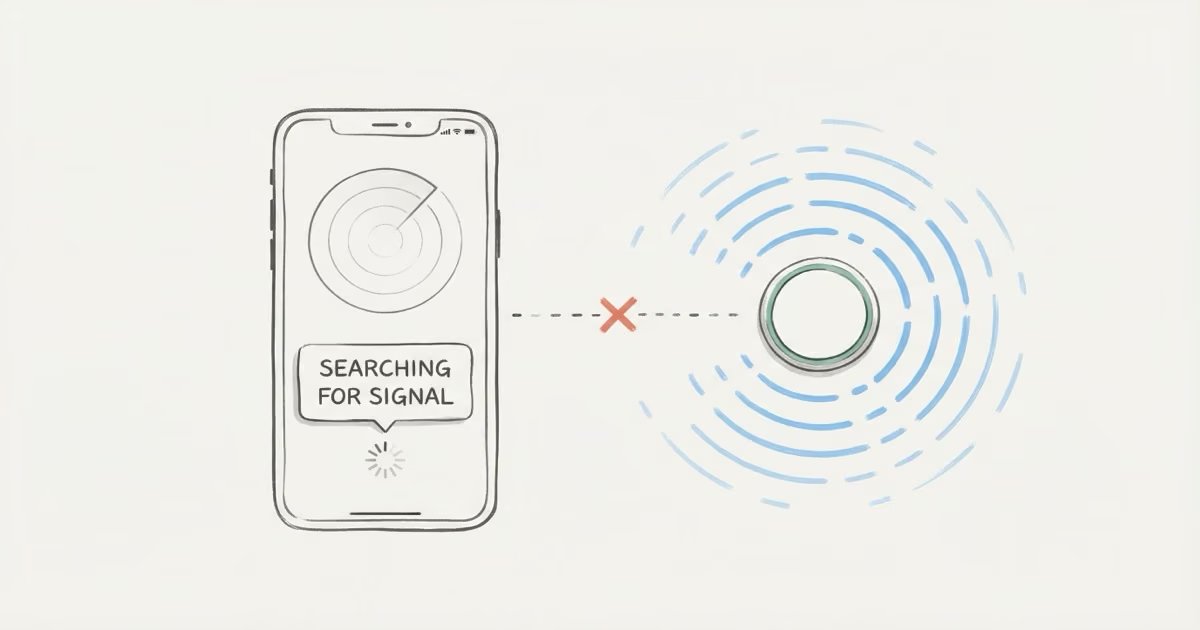
"Searching for Signal" means Find My is trying to reach your AirTag over Bluetooth and failing. This is completely normal when you're far from the tag. It just shows the last crowd-network location instead. If you're standing right next to the AirTag and still see this message, the fix is usually a dead CR2032 battery, signal interference from metal or concrete, or a simple reset.
That "Searching for Signal" message looks alarming. It isn't. Most of the time, it's your iPhone saying it can't see the AirTag right now, which is expected whenever you're not physically close to it. Here's what's actually happening and what to do about it.
- "Searching for Signal" is the normal state whenever you're out of Bluetooth range — roughly 10 meters indoors or 30 meters outdoors — and does not indicate a broken AirTag.
- Metal enclosures, thick concrete, and car body panels can block the signal even when you're standing right next to the AirTag, making repositioning the fix rather than resetting.
- A dying CR2032 battery reduces Bluetooth range before the battery fully dies — replacing it once a year eliminates most repeated "Searching" issues.
- AirTag 2's U2 chip extends Precision Finding from 15 meters to 60 meters, so you get the directional arrow four times sooner when searching for the tag.
- The Find My crowd network still shows a "Last Seen" location even when direct Bluetooth fails — that map pin is your best starting point when "Searching for Signal" persists.
What Does AirTag "Searching for Signal" Mean?
Your AirTag has two ways to tell you where it is. The first is the Find My crowd network: over a billion Apple devices worldwide silently pick up your AirTag's Bluetooth ping and relay its encrypted location to Apple's servers. That's how you see a "Last Seen" location even when you're across town. No direct connection needed.
The second is a direct Bluetooth link. When your iPhone gets within about 10 meters (33 feet), it connects to the AirTag directly and gives you a live position. On iPhones with a U1 or U2 chip, this also activates Precision Finding with a directional arrow. This is the connection that matters.
"Searching for Signal" appears when Find My tries to establish that direct link and can't find the tag. Your iPhone is scanning for the AirTag's Bluetooth broadcast and coming up empty. The important thing: this is the default state for any AirTag that isn't physically near you. If your keys are at home and you're at the office, you'll see "Searching for Signal." That's normal. The crowd-network "Last Seen" location is what you'd use in that scenario.
It only becomes a problem when you're standing within a few meters of the AirTag and the message won't clear. I've left AirTags on my keys at home for entire workdays and come back to "Searching for Signal" the whole time — the moment I walk through the front door it snaps to Precision Finding without any intervention.
Why Your AirTag Shows "Searching for Signal"
You're Out of Bluetooth Range
This covers about 80% of cases. AirTag's direct Bluetooth connection tops out at roughly 10 meters indoors and 30 meters outdoors with clear line of sight. Walls, floors, and furniture cut that range fast. If you're in a different room, a different floor, or across a parking lot, your iPhone simply can't hear the tag. AirTag 2's improved antenna extends crowd-network detection range slightly, but the direct-connection distance is still fundamentally limited by Bluetooth Low Energy physics.
Signal Interference Blocking the Connection
Bluetooth doesn't punch through metal. An AirTag inside a metal toolbox, a fire safe, an aluminum suitcase, or behind a commercial refrigerator may show "Searching for Signal" even when you're right next to it. Thick concrete walls and floors cause the same problem. One Apple Community thread describes users unable to detect their AirTag inside a parked car while standing outside the vehicle, because the car's metal body was absorbing the signal.
Dead or Dying CR2032 Battery
As the battery drains, Bluetooth signal strength drops before the AirTag fully dies. An AirTag that connected fine last month might now only reach half its normal range. CR2032 batteries last roughly a year. If yours is older than 10 months, the battery is worth checking first. Open Find My, tap the AirTag, and look for the battery icon. A low indicator means it's time. Full steps at how to replace AirTag battery.
Location Services or Bluetooth Turned Off on Your iPhone
This one catches people. If Bluetooth is off on your iPhone, or if Location Services is disabled, Find My can't scan for the AirTag at all. Go to Settings > Privacy & Security > Location Services and confirm it's on. Also check Settings > Bluetooth. While you're there, make sure Find My has location permission set to "While Using" or "Always."
Hardware Defect
Rare. If a brand-new AirTag shows "Searching for Signal" when it's literally in your hand, and you've confirmed Bluetooth is on, battery is fresh, and it's paired to the correct Apple ID, you may have a defective unit. Apple's one-year warranty covers this. Check the serial number in Find My (Items > your AirTag) before contacting Apple Support.
5 Fixes for AirTag Searching for Signal (In Order)
Work through these in sequence. Most people never get past step 2.
Fix 1: Walk toward the AirTag's last known location. Open Find My, note the map pin, and physically move toward it. Once your iPhone gets within Bluetooth range, the "Searching" message typically clears in seconds. On AirTag 2, Precision Finding kicks in at roughly 60 meters thanks to the U2 chip, so you'll see the directional arrow well before you reach the tag. On the original AirTag, you need to be within about 15 meters for the arrow to appear.
Fix 2: Remove interference. If you're standing close to the AirTag's location and it still says "Searching for Signal," check what's between you and the tag. Metal enclosures, thick concrete, even a parked car's body panels can block Bluetooth entirely. Try moving the AirTag to an open area. If the connection snaps back instantly, you've found your problem. Consider repositioning the tag somewhere less shielded. More on what affects tracking accuracy in our AirTag accuracy guide.
Fix 3: Replace the CR2032 battery. Takes 60 seconds. Press down on the stainless steel back cover and twist counterclockwise until it stops. Remove the old battery. Drop in a fresh CR2032 positive-side up, press until you hear a chime, then twist the cover back clockwise. The AirTag reconnects automatically. Apple's battery replacement guide has photos if you need them. One tip: avoid batteries with a bitter coating (like Duracell's) since some users report connection issues with coated CR2032s. When I replaced a Duracell with a Panasonic CR2032 on an AirTag that was dropping in and out, the signal stabilized immediately — brand matters more than most people expect.
Fix 4: Reset the AirTag. According to Apple's reset instructions, you remove the battery, wait 5 seconds, reinsert it and press down until you hear a tone. Then remove and reinsert the battery four more times, pressing until you hear a tone each time. You'll hear five tones total. The fifth sounds different, confirming the reset. After that, hold the AirTag near your iPhone and re-add it through Find My. If your AirTag won't connect at all after the reset, that points to a hardware problem.
Fix 5: Check your iPhone settings. Go to Settings > Bluetooth and confirm it's on. Then check Settings > Privacy & Security > Location Services. Find My needs "While Using" or "Always" permission. Also verify Settings > Privacy & Security > Location Services > System Services > Networking & Wireless is toggled on. One user on Apple Community solved persistent signal issues by toggling Device Management under System Services.
AirTag "Searching for Signal" vs. Other Status Messages
Find My shows several different messages, and they don't all mean the same thing. Confusing "Searching for Signal" with "Not Reachable" or "Last Seen in red" leads to the wrong fix.
| Status Message | What It Means | Action |
|---|---|---|
| Searching for Signal | iPhone is actively scanning for AirTag over Bluetooth and not finding it | Get closer, check battery, remove interference |
| Not Reachable | AirTag detected on the network but can't establish a direct connection right now | Move around to connect |
| Last Seen (in red) | No Apple device has detected the AirTag for 24+ hours | Check battery, enable Lost Mode, visit last known location |
| Last Seen (in gray) | Normal. Shows the most recent crowd-network location update | No action needed |
You can see multiple statuses at once. An AirTag might show "Searching for Signal" (no direct connection) while also displaying a "Last Seen" location from the crowd network. That's the system working as designed. The crowd-network location is your best data point when direct Bluetooth isn't available.
How AirTag 2's U2 Chip Changes the Signal Experience
If you're still on the original AirTag, AirTag 2 makes the "Searching for Signal" situation less frustrating in one specific way: Precision Finding now works from 60 meters away instead of 15. That's a massive improvement. In a parking garage or a large building, you can start getting directional guidance from four times the distance. The original AirTag forces you to wander until you stumble into its tiny 15-meter UWB bubble.
The Bluetooth crowd-network range also improves modestly. But the direct-connection distance, the one that triggers "Searching for Signal," is still limited by BLE power output. You'll still see the message when you're far away. The difference is that once you start getting closer, AirTag 2 picks you up much sooner.
AirTag 2 also introduced Precision Finding on Apple Watch Series 9 and later, which is useful if you're searching for something and don't want to pull out your phone. According to Apple's announcement, the new speaker is 50% louder too, so Play Sound actually works from further away.
When "Searching for Signal" Actually Means Something Is Wrong
Most of the time, "Searching for Signal" just means distance. Walk closer and it resolves. But there are a few scenarios where the message points to a real problem:
- AirTag is in the same room as your iPhone and the message persists for more than 30 seconds. Battery is the likely culprit.
- The AirTag connected fine yesterday but won't connect today from the same distance. Battery degradation or a firmware glitch. Try removing and reinserting the battery.
- A brand-new AirTag never connects after setup. You've confirmed Bluetooth is on, your iPhone runs iOS 14.5 or later, and the tag is paired to your Apple ID. This is likely a defective unit. Apple replaces these under warranty.
- Multiple AirTags all show the same problem simultaneously. That points to your iPhone, not the tags. Restart your phone, check for iOS updates, and reset your network settings if needed.
If you've worked through all five fixes and the AirTag still won't connect when it should, contact Apple Support at support.apple.com. AirTags within the one-year warranty get free replacements. Out-of-warranty replacements run $29.
How Find My Locates Your AirTag Without a Direct Signal
This is why "Searching for Signal" usually isn't worth worrying about. Your AirTag doesn't stop working when it loses direct contact with your iPhone. It keeps broadcasting a rotating encrypted identifier every few seconds. Any of the over one billion Apple devices in the Find My network can pick up that broadcast, note the AirTag's location using their own GPS, and forward it to Apple's servers.
Your iPhone then pulls that location data from the server. You see a map pin with a "Last Seen" timestamp. The whole process is end-to-end encrypted. Apple can't see the location, the person whose iPhone relayed it can't see it, and neither can anyone else. Only your Apple ID unlocks it.
In cities, this works well. iPhones are everywhere, so your AirTag's location stays fresh. In rural areas or places with fewer Apple devices, the "Last Seen" data goes stale faster. That's not a malfunction. Just fewer relay devices around. For more on how AirTag handles connectivity gaps, see does AirTag have GPS and does AirTag work without WiFi.
The Bottom Line
"Searching for Signal" almost always means one thing: your iPhone can't see the AirTag right now. Walk closer to where it should be. If it still won't connect, swap the CR2032 battery, check for metal or concrete blocking the signal, and reset the tag. That solves it in the vast majority of cases. If nothing works and the AirTag is within warranty, Apple replaces it for free.
Frequently Asked Questions
What does "Searching for Signal" mean on AirTag?
Find My is trying to connect to your AirTag over Bluetooth and not finding it. This is the normal state when you're out of range, which is roughly 10 meters indoors and 30 meters outdoors. The app falls back to showing the last crowd-network location. It's only a problem if you're physically close to the tag and the message won't clear.
Is "Searching for Signal" different from "Not Reachable"?
Yes. "Searching for Signal" means your iPhone is actively scanning and can't detect the AirTag at all. "Not Reachable" means the network knows the AirTag is nearby but your iPhone can't establish a stable direct connection. "Not Reachable" usually resolves by walking around the area slowly, while "Searching for Signal" typically means you need to get significantly closer or check the battery.
How far can an AirTag signal reach?
The direct Bluetooth connection works up to about 10 meters indoors and 30 meters outdoors with clear line of sight. Precision Finding activates within 15 meters on the original AirTag and 60 meters on AirTag 2. The Find My crowd network has no distance limit since it relies on other Apple devices worldwide to relay location data.
Why does my AirTag keep losing signal in the same spot?
If an AirTag keeps dropping signal in a location where it previously worked fine, the battery is almost always the cause. CR2032 output drops gradually, shrinking effective Bluetooth range over weeks before the battery fully dies. Replace it and the connection should stabilize. If a fresh battery doesn't help, check whether something new is blocking the signal path, like a metal shelf or appliance that wasn't there before.
How do I reset an AirTag to fix signal issues?
Remove the battery, wait at least 5 seconds, reinsert it and press down until you hear a tone. Remove and reinsert the battery four more times, pressing down each time until you hear a tone. The fifth tone sounds different, confirming the reset. Then hold the AirTag near your iPhone and follow the setup prompt in Find My to re-pair it.
Does AirTag 2 have better signal than the original?
The direct Bluetooth range is similar, but Precision Finding range jumps from 15 meters to 60 meters thanks to the U2 chip. That means AirTag 2 starts guiding you with the directional arrow from four times farther away. The speaker is also 50% louder, so Play Sound works from greater distances. For most people, the Precision Finding upgrade is the biggest practical difference.
Can metal or concrete block AirTag signal?
Absolutely. Metal is the worst offender. An AirTag inside a metal safe, toolbox, or aluminum case may not be detectable even from a few feet away. Thick reinforced concrete walls and floors also block or severely weaken the Bluetooth signal. If you suspect interference, move the AirTag to an open area to test. Connection restoring immediately confirms the enclosure was the problem.