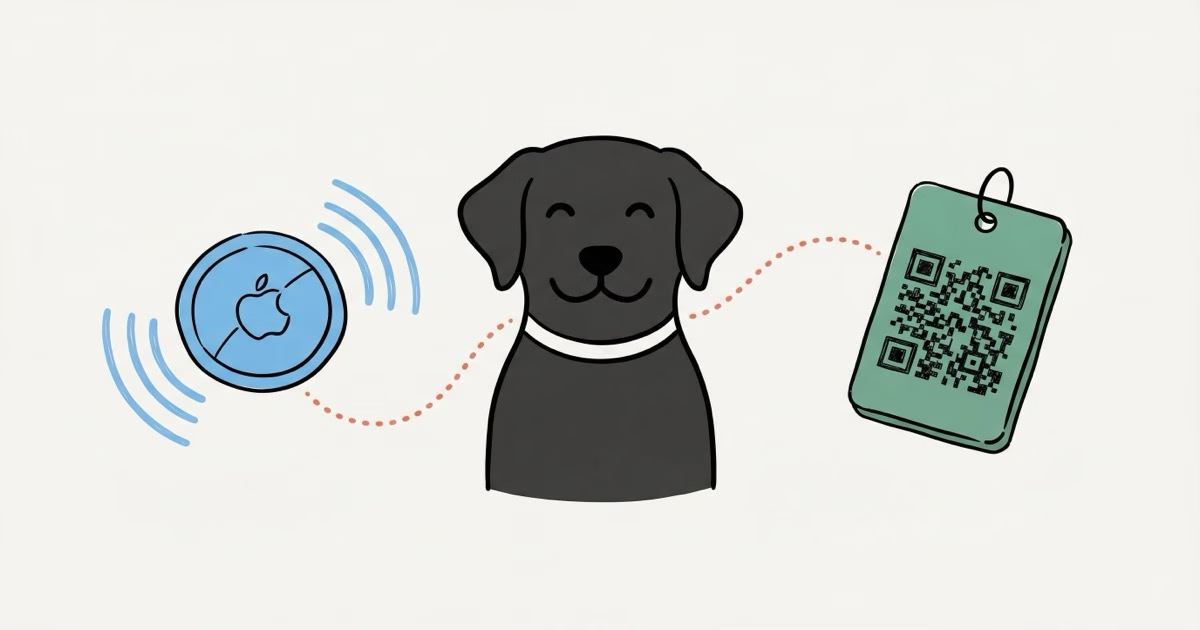
AirTag and ByteTag solve completely different problems. The Apple AirTag 2 is a Bluetooth tracker that shows your dog's location on a map using Apple's Find My network. ByteTag is a $19.95 QR code ID tag that someone scans after finding your dog, then it sends you their GPS coordinates. AirTag finds your dog. ByteTag helps a stranger return your dog. Most dog owners should get both.
The old version of this article got something wrong. It treated ByteTag like a Bluetooth tracker competing directly with AirTag. That's not what ByteTag is. ByteTag is a smart pet ID tag with a QR code on the back. No batteries. No Bluetooth. No network pinging nearby phones.
This matters because choosing between them isn't really a "versus" decision. They do different things.
AirTag broadcasts a Bluetooth signal that piggybacks on every iPhone running iOS 14.5 or later. Your dog wanders into a neighborhood, and nearby iPhones silently relay its location to your Find My app. You open your phone and see a pin on a map. With an iPhone 11 or newer, you get Precision Finding, a directional arrow that points you within inches of the tag. The whole thing works without anyone noticing or doing anything.
ByteTag works differently. Your dog's tag has a QR code. When someone finds your dog, they point their phone camera at it. No app needed. A browser page pops up showing your dog's name, your phone number, vet info, medications, anything you've entered in the ByteTag profile. At the same time, you get a push notification, email, and text with the finder's GPS coordinates.
How AirTag and ByteTag Actually Track Dogs
They don't both track. That's the first thing to understand.
AirTag is active tracking. It continuously broadcasts a Bluetooth Low Energy signal. Apple's Find My network, which includes over 2 billion devices worldwide, picks up that signal and relays encrypted location data to Apple's servers. You see location updates in the Find My app without the dog or anyone else doing anything intentional. In a dense urban area with lots of iPhones nearby, updates can come every few minutes. In rural areas with sparse iPhone traffic, you might wait hours between pings, or get nothing at all.
ByteTag is reactive identification. Nothing happens until a human physically scans the QR code. The tag itself has no electronics, no battery, no wireless signal. It's a durable metal or plastic tag with a unique QR code printed on it. The "tracking" only kicks in when someone finds your dog and scans the code. At that point, you get notified with GPS coordinates from the finder's phone.
Think of it this way: AirTag is a search tool. ByteTag is a return tool.
AirTag vs ByteTag: Full Specs Comparison
| Feature | Apple AirTag 2 | ByteTag |
|---|---|---|
| Type | Bluetooth tracker | QR code ID tag |
| How it works | Find My network (passive Bluetooth relay) | QR code scan by finder |
| Price | $29 (1-pack) | $19.95 |
| Battery | CR2032, ~12-14 months | ✓ None needed |
| Phone required | iPhone only (iOS 14.5+) | ✓ Any smartphone |
| Finder needs app? | No (network works automatically) | No (QR opens in browser) |
| Real-time location | ⚠ Crowd-sourced, not GPS | ✗ Only when scanned |
| Precision Finding | ✓ Yes (UWB, iPhone 11+) | ✗ No |
| Waterproof | IP67 (1m / 30 min) | Waterproof (no electronics) |
| Subscription | None | None |
| Collar attachment | Needs separate holder ($5-35) | Built-in ring |
| Weight | 11g (+ holder) | ~8g |
| Pet profile | ✗ No | ✓ Full profile (vet, meds, contacts) |
| Works with Android | ✗ No | ✓ Yes (owner + finder) |
The table makes the core difference obvious. AirTag is an electronic device that actively broadcasts its position. ByteTag is a physical tag that stores information. Comparing their "specs" is a bit like comparing a walkie-talkie to a business card. Both useful, but for very different reasons.
When AirTag Is the Better Choice for Dogs
AirTag wins when your priority is finding your dog yourself, without relying on a stranger to find them first.
If your dog slips out a door or digs under a fence, AirTag lets you open the Find My app and see where they went. In cities and suburbs with dense iPhone populations, location updates come frequently enough to follow your dog's general path. I've tested AirTags in downtown areas where updates came every 2-3 minutes. The closer you get, the more useful it becomes. Precision Finding kicks in within about 15 meters, showing you a directional arrow on your iPhone screen that points straight at the tag.
That said, AirTag has limits for pet use. It wasn't designed for dogs. You need a collar holder or AirTag-compatible dog collar to attach it. The anti-stalking feature means if your dog hangs around the same neighbor's yard, that neighbor might get an "Unknown AirTag" alert on their iPhone. And AirTag requires you to own an iPhone. No iPhone, no tracking. For a deeper look at practical dog tracking with AirTag, our AirTag dog tracking guide covers the real-world scenarios.
When ByteTag Is the Better Choice
ByteTag wins when your goal is making sure a found dog gets returned quickly.
Traditional engraved tags have your phone number, maybe your dog's name. That's it. ByteTag gives the finder a full digital profile: multiple phone numbers, email, home address, vet clinic, medical conditions, feeding instructions, behavioral notes. If your dog has allergies or takes medication, that information is immediately available to whoever finds them. You control what's visible through the ByteTag app, and you can toggle privacy on and off.
The other advantage: ByteTag works with every smartphone on earth. Android, iPhone, old phones, new phones. The finder doesn't need any app. They just open their camera and point it at the QR code. According to Pocket Puppy School's review, the QR scan process works reliably across devices, and the notification to the owner is near-instant.
ByteTag also has zero maintenance. No battery changes. No firmware updates. No charging. The tag works until the QR code physically wears off, which takes years on their metal tags.
The Privacy Toggle
One feature worth highlighting: ByteTag lets you hide your contact information when your dog isn't lost. If you're walking your dog at the park, anyone could theoretically scan the tag and see your phone number. The privacy toggle in the app hides everything until you switch it back on. Most engraved tags can't do this.
What ByteTag Can't Do
ByteTag can't tell you where your dog is right now. It can't show you a map. It can't alert you when your dog leaves your yard. It relies entirely on a good samaritan finding your dog and scanning the code. If your dog runs into a forest where nobody goes, ByteTag won't help you find them. This isn't a flaw, it's just what the product is. It's a smarter version of a traditional dog tag, not a tracker.
There's also a practical scanning issue. A panicked dog running loose in a neighborhood isn't going to sit still while someone lines up a QR code scan. The finder needs to catch and calm the dog first. ByteTag works best when a well-meaning neighbor has already scooped up your dog and is trying to figure out who it belongs to. For active tracking during the search phase, you still need something like an AirTag broadcasting its signal to the Find My network.
The Real Answer: Use Both Together
This isn't a cop-out recommendation. AirTag and ByteTag cover different failure modes, and using both costs less than a single GPS tracker.
AirTag handles the first phase: locating a missing dog. You get a map pin, a direction to walk, and Precision Finding when you're close. But AirTag can't tell a stranger who finds your dog how to contact you. It can show a message in Lost Mode if someone taps it with an iPhone, but that requires the finder to have an NFC-capable iPhone and know what an AirTag is.
ByteTag handles the second phase: getting your dog home after someone finds them. The QR code is universal, obvious, and works instantly. Anyone with any phone can scan it.
Together, the setup costs about $50. AirTag at $29 plus ByteTag at $19.95. No subscriptions for either. As Pocket Puppy School noted in their combination guide, the two products together cover virtually every lost-dog scenario for under $50 total with no ongoing costs.
AirTag Limitations Dog Owners Should Know
AirTag works well in populated areas. It struggles in others.
The Find My network needs nearby iPhones to relay signals. In a dense suburb, that's almost always the case. In a rural area with few iPhone-carrying neighbors, your dog could wander for hours without a single location update. I've seen this firsthand in semi-rural areas where AirTag went silent for 45 minutes during a test. For a breakdown of how network density affects real-world accuracy, see our guide to AirTag accuracy.
Other practical concerns for dogs:
- Anti-stalking alerts: If your dog stays near a neighbor's iPhone for extended periods, the neighbor gets an "unknown AirTag" notification. Not a deal-breaker, but it startles people.
- No Android support: Your partner, dog walker, or family member with an Android phone cannot track the AirTag at all. Find My is iPhone-only.
- Holder required: AirTag doesn't clip to a collar on its own. Budget $5-15 for a decent third-party holder. Apple's own accessories start at $35.
- Size and weight: AirTag (11g) plus a holder adds roughly 20-30g to a collar. Fine for dogs over 15 lbs. Potentially uncomfortable for very small dogs under 10 lbs.
For a full rundown of AirTag's strengths and weaknesses as a product, the AirTag 2 review covers everything including the new louder speaker and improved UWB range.
ByteTag Limitations Dog Owners Should Know
ByteTag's weakness is simple: nothing happens until a human intervenes.
If your dog escapes into an unpopulated area, ByteTag does nothing. If your dog is running loose in a park but nobody catches them, ByteTag does nothing. The system only activates when someone physically holds the dog still enough to scan a small QR code on a moving collar tag. That's harder than it sounds with a panicked or energetic dog.
A few reviewers have also noted the split ring attachment isn't the most secure. Rebarkable's review specifically mentioned the tag getting pulled off within weeks. If you buy ByteTag, consider replacing the split ring with a sturdier one from a hardware store.
The tag also can't display a name on the physical surface. You can't have "Max" or "Call 555-1234" printed on it. The front shows the ByteTag brand design, the back has the QR code. For owners who want visible contact info even without a phone scan, a traditional engraved tag plus ByteTag would cover both scenarios.
What About GPS Trackers Instead?
If your dog escapes regularly and you need real-time, continuous tracking anywhere, neither AirTag nor ByteTag is the right answer. You need a cellular GPS tracker.
Devices like Tractive and Fi use built-in GPS and a cellular connection to update your dog's location every few seconds, anywhere with cell service. They work regardless of nearby phones. The tradeoff: they cost $80-200 upfront and charge $5-15 per month. They're also heavier and need regular charging.
AirTag is a solid middle ground for occasional escapees in populated areas. ByteTag is a modern replacement for the engraved ID tag. GPS trackers are for dogs that disappear frequently or in areas where crowd-sourced tracking won't work. Our guide to GPS pet trackers covers the subscription-based options in detail.
Who Should Buy What
Buy AirTag if: You have an iPhone, live in a city or suburb, and want the ability to locate your dog on a map without depending on someone else finding them first. Pair it with a secure collar holder.
Buy ByteTag if: You want a smarter dog tag that shares medical info, multiple contacts, and vet details with anyone who finds your dog. Especially useful if your household uses Android phones or if your dog has health conditions a finder should know about.
Buy both if: You want the most complete lost-dog safety net under $50 with zero monthly fees. AirTag locates. ByteTag identifies. Together, they handle the two most likely scenarios when a dog goes missing.
Buy a GPS tracker if: Your dog escapes regularly, you live in a rural area, or you need real-time continuous tracking that doesn't depend on network density. Budget $100+ upfront and $5-15/month.
For more AirTag use cases beyond pet tracking, the 15 best uses for AirTag guide shows where it actually excels. And if you're exploring other Bluetooth trackers that work with Android, our AirTag alternatives roundup compares the full field.
Frequently Asked Questions
Does ByteTag actually track my dog's location?
No. ByteTag has no electronics, no Bluetooth, no GPS. It's a QR code printed on a durable tag. The only "tracking" happens when a person finds your dog, scans the code, and the finder's phone sends you their GPS coordinates. Between scans, ByteTag provides zero location data.
Can my Android-using family member track an AirTag?
Not through Apple's Find My app. AirTag tracking requires an iPhone. Android users can detect an unknown AirTag traveling with them (Apple released a detection feature for this), but they can't use Find My to see the tag's location. If your household is split between iPhone and Android, ByteTag is the better shared solution since the QR code works on any smartphone. For Bluetooth tracking on Android, Samsung SmartTag 2 and Chipolo Pop both offer comparable crowd-sourced networks.
Is ByteTag waterproof?
Yes. Since ByteTag has no electronics, water doesn't damage it. The metal tag designs are fully waterproof. The QR code is laser-etched or UV-printed and holds up in rain, snow, and swimming. AirTag is rated IP67 (submersion up to 1 meter for 30 minutes), which also handles typical dog activities including swimming.
How long does ByteTag last?
Years. There's no battery to die, no circuit to fail. The tag lasts until the QR code physically becomes unreadable from extreme wear, which takes a long time on their metal tags. AirTag's CR2032 battery lasts about 12 months and costs $3-5 to replace. According to Apple's support page, battery replacement takes under a minute.
Does AirTag work for cats too?
It works the same way, but size is a bigger concern. AirTag plus a holder weighs 20-30g, which is noticeable on a cat under 8 lbs. ByteTag's lighter weight (about 8g) is generally better tolerated by cats. Some cat owners prefer a lightweight AirTag holder designed for smaller collars to reduce the total weight.
Can someone steal my information from ByteTag?
ByteTag includes a privacy toggle. When your dog isn't lost, you can disable the profile so scanning the QR code shows nothing. When your dog goes missing, you toggle it on. You also control exactly what information appears: you could share just a phone number, or add vet info, medications, and a backup contact. It's up to you.
Should I use AirTag Lost Mode or ByteTag if my dog escapes?
Both, if you have both. Enable Lost Mode on AirTag immediately so the entire Find My network prioritizes location updates. Anyone who taps the AirTag with an NFC-capable iPhone will see your Lost Mode message. ByteTag works independently since the QR code is always scannable (assuming privacy mode is off). The two systems don't conflict or interfere with each other.