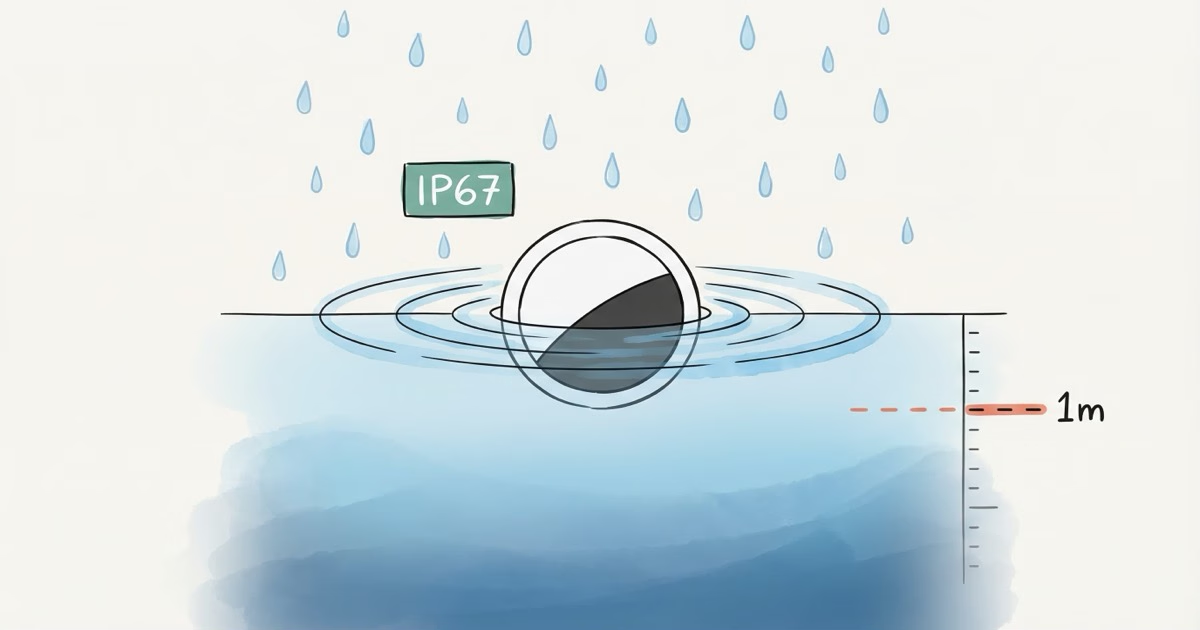
AirTags are water-resistant, not waterproof. Apple rates both the original AirTag and AirTag 2 at IP67 under IEC 60529 -- submersion in 1 meter of fresh water for up to 30 minutes. Rain, sweat, and a quick puddle drop are fine. Swimming pools, ocean water, and hot tubs are not. Apple does not cover water damage under warranty.
"Water-resistant" and "waterproof" sound similar, but the gap between them has ruined a lot of AirTags. IP67 sounds impressive on paper. It has hard limits, though, and Apple spells them out clearly if you know where to look. One accidental pool dip lasting 45 minutes or a single hot tub session can kill an AirTag that survived three years of rainstorms without a scratch. Below, you'll find which water situations are safe, which ones will wreck your tracker, and how to recover when things go sideways.
Are AirTags Waterproof or Just Water-Resistant?
Water-resistant. Full stop.
That answer covers every AirTag Apple has ever shipped. Both the original AirTag and AirTag 2 carry an IP67 rating under the IEC 60529 standard. Apple's AirTag 2 tech specs page describes the device as "splash, water, and dust resistant" and notes it was "tested under controlled laboratory conditions."
"Waterproof" would mean you could leave it at the bottom of a pool indefinitely. "Water-resistant" means it'll handle limited exposure under specific conditions. IP67 defines those conditions precisely. Go beyond them, and Apple won't back you with a warranty claim.
What Does the IP67 Rating Mean for Your AirTag?
IP67 is two numbers, each measuring a different threat. The "6" means completely dust-tight, which is the highest solid particle protection you can get. The "7" covers temporary immersion in up to 1 meter of water for up to 30 minutes. Both digits are tested under the IEC 60529 international standard.
Here's what most articles skip: the test uses clean, still, fresh water at room temperature. Real life doesn't work that way.
Saltwater corrodes seals faster than fresh water. Chlorinated pool water eats rubber gaskets. Hot tubs throw heat, chemicals, and jet pressure at a device that was tested in a calm lab tank. Even soapy washing machine water hits harder than the sterile environment Apple used for certification. The IP67 rating is a minimum guarantee under ideal conditions. Real-world water is almost always rougher than the test.
What the Numbers Actually Protect Against
The first digit (6) guarantees no dust enters the enclosure. For an AirTag riding in your pocket, backpack, or on a keyring, sand, lint, and fine particles won't get inside. That's the maximum dust rating available.
The second digit (7) is where things get conditional. Protection level 7 specifically covers immersion in up to 1 meter of static fresh water for no more than 30 minutes. Pressurized water from showers, garden hoses, or pressure washers? Not covered. Moving water in rivers or ocean waves? Also not covered. Anything deeper than 1 meter is out of spec too. The seal holds against passive water pressure at shallow depth, but push harder and water gets in.
How IP67 Compares to Higher Ratings
IP68 allows deeper, longer submersion. The iPhone 15 Pro, for example, is rated IP68 for 6 meters and 30 minutes. IPX8 cases for AirTags go further still, with continuous submersion well beyond 1 meter. If your AirTag regularly ends up in water, a waterproof case is the only real fix.
Which Water Situations Are Safe for AirTag?
Not every splash is equal. Here's a practical breakdown based on the IP67 rating and what AirTag owners actually report happening.
| Scenario | Safe? | Why |
|---|---|---|
| Rain (light or heavy) | ✓ Yes | Surface water, no submersion |
| Sweat (gym bag, pocket) | ✓ Yes | Moisture, not submersion |
| Dropped in puddle | ✓ Yes | Brief, shallow submersion |
| Spilled drink | ✓ Yes | Rinse with clean water after |
| Normal shower | ⚠ Risky | Low-pressure but prolonged and warm |
| Pool (under 30 min) | ⚠ Risky | Depth is fine, chlorine degrades seals |
| Washing machine | ✗ No | Agitation, heat, detergent, extended time |
| Ocean / saltwater | ✗ No | Salt corrodes seals faster than fresh water |
| Hot tub / jacuzzi | ✗ No | Heat + chemicals + water jets |
| Swimming laps (30+ min) | ✗ No | Exceeds time limit, repeated exposure |
| Pressure washer | ✗ No | IP67 does not cover pressurized water |
The pattern is simple: accidental, brief exposure to clean water is fine. Intentional or prolonged exposure to chemically treated water is not. Tracking luggage, keys, a backpack, or a car? Rain and puddle splashes won't hurt it. But if you're attaching an AirTag to a surfboard or tossing it in a swim bag that goes underwater, get a waterproof case.
Can an AirTag Survive the Washing Machine?
Usually, yes. But Apple would prefer you didn't find out firsthand.
Intego's durability testing ran an AirTag through a full 54-minute wash and spin cycle. It survived. It was even locatable during the wash and worked normally afterward. Reddit and Apple Community forum posts tell the same story: AirTag forgotten in a pants pocket, pulled out after the cycle, still tracking fine.
That said, a washing machine breaks IP67 specs in several ways at once. Cycles run well past 30 minutes. The agitator throws forces at the AirTag that no IP test simulates. Detergent and warm water are harsher than the clean, room-temperature fresh water used in certification. One accidental wash will probably be fine. Do it repeatedly and you'll eventually kill the seal.
If your AirTag went through the wash: open the battery compartment, remove the CR2032, dry everything with a lint-free cloth, and let the components air dry for a few hours before reassembling. Don't use a hair dryer on hot.
Why You Can't Track an AirTag Underwater
Even if your AirTag survives a dip, there's a separate problem. Water blocks Bluetooth signals almost completely.
AirTags rely on Bluetooth Low Energy to ping nearby iPhones in Apple's Find My network. Drop one in even a few inches of water and the signal practically vanishes. In testing, an AirTag under 4 inches of water with optimal antenna orientation could only reach an iPhone about 30 feet away. In most orientations, the phone had to be within 1 foot to pick up anything at all.
So even if your AirTag physically survives underwater, it goes dark. No Bluetooth signal, no location updates. It won't show up in Find My until it's back above the surface and within range of a passing iPhone. Drop an AirTag in a lake and it might survive just fine, but it can't tell you where it landed until somebody fishes it out. For tracking things near open water, a GPS tracker with cellular connectivity is a better bet.
Does Water Resistance Degrade Over Time?
Yes. Apple says so directly on their AirTag tech specs page: "Splash, water, and dust resistance are not permanent conditions and resistance might decrease as a result of normal wear."
Three things accelerate that degradation:
Battery replacement opens the seal. Every time you twist off the stainless steel back cover to swap the CR2032, you're breaking and reseating the gasket between the cover and body. Most people do this once a year. Apple doesn't re-certify water resistance after a battery change. The seal may not sit as tightly the second or third time around. For details on battery life expectations in different environments, check our best uses for AirTag guide.
Physical damage compromises the housing. Drop an AirTag on concrete and the stainless steel cover can dent slightly. Even a small deformation creates a gap for water entry.
Chemical exposure eats rubber. Chlorine, saltwater, sunscreen, and cleaning products all wear down the gasket faster than clean water. If your AirTag touches any of these, rinse it under clean tap water and dry it well. The chemicals keep degrading the seal even after the AirTag looks dry on the outside.
Waterproof Cases and Holders That Actually Work
If your AirTag regularly gets wet, a third-party waterproof case is the answer. The bare AirTag handles accidents. A case handles intent.
Elevation Lab TagVault
The original waterproof AirTag holder, and still the best all-around pick. It uses a screw-on polycarbonate shell with a silicone gasket that seals the AirTag inside, rated well beyond IP67. You can get it as a keychain, adhesive surface mount, strap mount, or magnetic version for metal surfaces. The keychain model also works well as a dog collar mount for rainy walks.
The screw-on design is the key advantage. Unlike snap-fit cases that pop open on impact, this one stays sealed through rough use. For more mounting ideas, browse our AirTag holders and accessories guide.
Catalyst Total Protection Case
Rated IP68 and waterproof to 330 feet (100 meters). Also MIL-STD-810G drop-tested to 10 feet. Overkill for most people, but if you're a diver, kayaker, or sailor tracking expensive gear on the water, this is the one to buy. Bulkier and pricier than the TagVault, but the depth rating is in a completely different league. Nobody else comes close for true underwater protection.
Belkin Secure Holder with Strap
IPX8-rated, tested at 1.5 meters for 30 minutes. Belkin is Apple-authorized, which is reassuring if brand trust matters to you. It sits in the middle price-wise and protection-wise between the TagVault and the Catalyst.
AirTag Water Resistance vs. Other Trackers
Most premium Bluetooth trackers share the same IP67 rating. Samsung SmartTag 2? IP67. Tile Pro 2024? IP67. Chipolo Pop? IP67. Water resistance alone won't help you pick a winner here.
A few design differences matter, though. The SmartTag 2 has the same IP67 spec but more exposed seams in its housing. Tile's sealed-battery models (Tile Mate, Tile Slim) never have their seal broken for battery swaps, which should theoretically preserve water resistance longer than AirTag's user-replaceable CR2032 design. The tradeoff: when an AirTag's battery dies, you spend $3 on a CR2032 instead of buying a whole new tracker.
No consumer Bluetooth tracker handles sustained underwater use without a case. Honestly, the tracking network and your phone's ecosystem matter far more than water ratings when you're choosing a tracker.
What to Do If Your AirTag Gets Wet
Brief rain or a quick splash? Wipe it dry and move on. IP67 handles that without issue.
For anything more serious, like actual submersion, a pool dip, or a wash cycle, follow these steps:
1. Remove the battery immediately. Press down on the stainless steel cover and twist counterclockwise. Take out the CR2032 to prevent short circuits.
2. Dry all components. Use a soft, lint-free cloth to wipe the battery, the inside of the cover, and the battery cavity. Get into every crevice you can reach.
3. Air dry for several hours. Leave the AirTag open (cover off, battery out) in a dry spot with decent airflow. Overnight is better if you're not in a rush. Don't blast it with compressed air since that can force water deeper into the device. Skip the hair dryer on high heat too.
4. Skip the rice. It doesn't work. Rice dust can enter the device and cause more problems than the water did.
5. Reassemble and test. Put the battery back in, twist the cover clockwise until it clicks, and check Find My on your iPhone. If the AirTag connects and plays a sound, you're good. If it doesn't respond, try a fresh CR2032 first. The old battery may have corroded from moisture even if the AirTag itself is fine. Still nothing? Our location not updating troubleshooting guide covers additional fixes.
If the AirTag was exposed to saltwater, chlorine, or soap, rinse it under clean tap water first, then follow the steps above. The chemicals do more damage than the water itself.
AirTag 2 vs. Original AirTag: Any Water Resistance Difference?
None. Both carry identical IP67 ratings. Apple didn't upgrade the water resistance between generations.
Apple focused the AirTag 2 upgrades elsewhere. The U2 ultra-wideband chip extends Precision Finding range to roughly 60 meters (up from about 10 meters on the original). The speaker is 50% louder, and there are improved anti-stalking alerts. But the physical housing and the battery compartment seal? Essentially the same design.
If your original AirTag handles rain fine, your AirTag 2 will do exactly the same. No reason to upgrade for water resistance alone.
The Bottom Line
AirTags handle rain, sweat, and the occasional puddle without breaking a sweat. That covers 95% of real-world water exposure. Pools, oceans, hot tubs, and extended submersion are a different story. For those, you either need a waterproof case or you need to keep the AirTag dry. Grab a TagVault if water is a regular concern and stop worrying about it.
Frequently Asked Questions
Are AirTags waterproof?
No. They're water-resistant with an IP67 rating, which covers submersion in 1 meter of fresh water for up to 30 minutes under lab conditions. Rain and splashes are perfectly safe, but pools, oceans, and hot tubs go beyond what IP67 is designed for. Apple explicitly excludes water damage from their warranty, which tells you plenty about how they feel about extended water exposure.
Can AirTags survive rain?
Easily. Rain doesn't come anywhere close to the IP67 limit. You can leave an AirTag on a bike or clipped to a dog collar in a downpour and it'll be fine.
What happens if my AirTag goes through the washing machine?
Probably fine. Intego's testing confirmed AirTags work normally after a full 54-minute wash cycle, and forum posts back that up. Washing machines do exceed IP67 specs in duration, agitation, and temperature, so don't make it a habit. After an accidental wash, pop open the battery compartment and let everything air dry for a few hours before putting it back together.
Does replacing the battery reduce water resistance?
It can. Every battery swap requires twisting off the back cover, which disturbs the seal. Apple doesn't re-certify water resistance after replacement. Most users notice no difference, but the seal may not seat as precisely on the second or third swap. Avoid exposing your AirTag to water right after a battery change until you've confirmed the cover is fully clicked into place.
Is AirTag safe for the beach?
Beach bag on the sand? Yes. Sea spray and splashes are within spec. Actual ocean submersion? No. Saltwater corrodes seals much faster than the fresh water used in IP67 testing. Track a surfboard or kayak with a waterproof case, not a bare AirTag. Salt exposure after a single ocean dip can weaken the gasket even if the AirTag still works afterward, so rinse with fresh water immediately if it contacts the sea.
Do I need a waterproof case for my AirTag?
For most people, no. Keys, wallets, backpacks, luggage: the built-in IP67 rating handles all of those without trouble. But if you're mounting an AirTag on a bike left outside, a boat, or any water sports gear that regularly gets submerged, a case like the Elevation Lab TagVault is worth the $15-20.
Can I track an AirTag underwater?
No. Even if the AirTag survives submersion, water blocks Bluetooth signals almost completely. An AirTag under just a few inches of water becomes nearly undetectable by nearby iPhones. It won't update its location in Find My until it's out of the water and within range of a device on the Find My network. The AirTag may be physically fine, but it goes dark until it dries out.
Does AirTag 2 have better water resistance than the original?
No. Both models are rated IP67 with identical specs. The AirTag 2 upgrades focused on the U2 chip for longer Precision Finding range, a louder speaker, and anti-stalking improvements. If you're happy with how your original AirTag handles moisture, expect the same from AirTag 2.