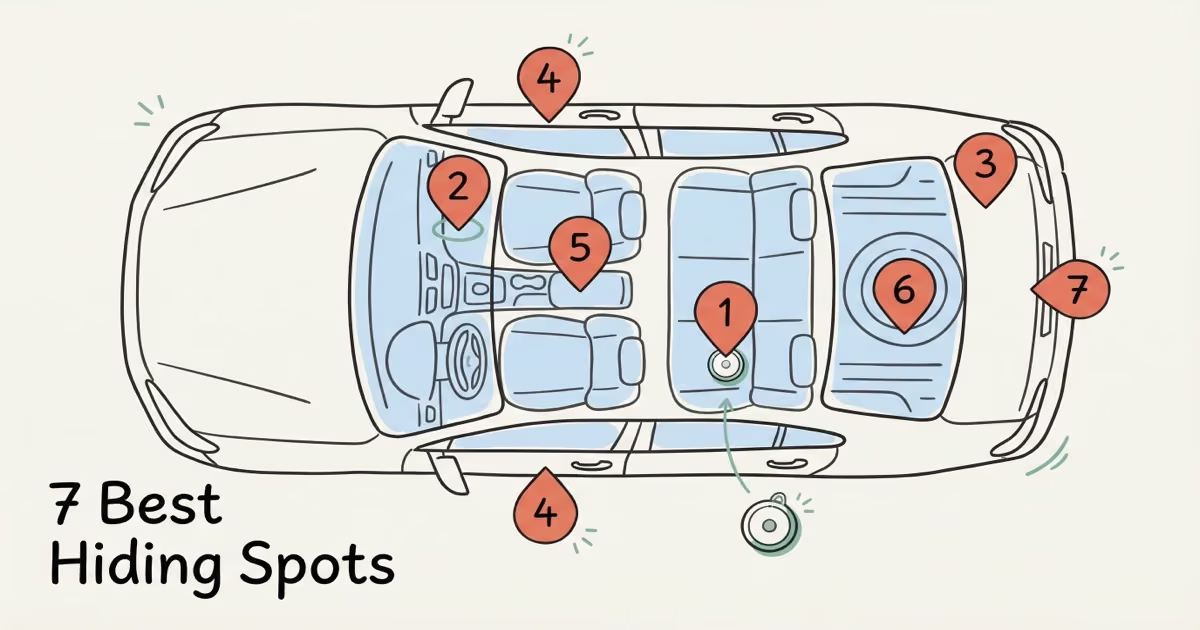
The best place to hide an AirTag in your car is under a rear seat: strong Bluetooth signal through fabric and plastic, decent concealment, and no tools needed for battery swaps. The OBD-II area under the dashboard is the easiest install with equally strong signal. For deepest concealment, a door panel cavity or trunk lining edge is where a thief needs tools to find it. Avoid the engine bay, wheel wells, and any flat exterior metal. Heat kills the battery, metal kills the signal.
Car theft in the U.S. dropped 23% through most of 2025 (the steepest decline in 40 years), but nearly 850,000 vehicles were still stolen in 2024 alone. AirTag has become one of the most practical recovery tools available, especially at $29 with no monthly fee. The problem is placement. A badly hidden AirTag either gets blocked by thick steel (going silent right when you need it most) or gets found by a semi-competent thief in under two minutes. The spots below are ranked by three factors: Bluetooth signal penetration, concealment depth, and how easy it is to swap the CR2032 battery annually. AirTag 2, released January 2026, changes the calculus on a few of these spots.
- The rear seat is the best single hiding spot: strong Bluetooth signal through fabric and plastic, decent concealment, and no tools needed for battery swaps.
- Pair two AirTags in different spots — one accessible (OBD area or rear seat), one deeply hidden (door panel or trunk lining) — so a thief who finds one still leaves the other transmitting.
- Interior plastic placements consistently outperform exterior metal mounts; thick steel body panels can reduce Bluetooth signal to near zero in worst-case positions.
- Avoid the engine bay (temperatures exceed AirTag's 60°C limit), wheel wells (vibration and spray damage), and any exterior flat-mount surface a thief checks in seconds.
- AirTag 2 (January 2026) adds extended UWB range and an "Improved Moving" feature that increases update frequency while the car is in transit — a meaningful upgrade for theft recovery.
What Makes a Good Hiding Spot for an AirTag in a Car
Three things decide whether a hiding spot actually works: signal, concealment, and battery access.
Signal is first. AirTag doesn't have GPS. It piggybacks on other people's iPhones. Every device running iOS 14.5 or later acts as a silent relay, picking up the AirTag's Bluetooth ping and forwarding the encrypted location to Apple's servers. Thick steel body panels scatter and absorb that signal. Plastic trim, carpet, and glass let it through. A beautifully hidden AirTag behind a steel wheel arch is basically invisible to the Find My network.
Concealment is second, but the goal here isn't just "not visible." It's buying time. A spot that requires trim tools to access gives you a 10-to-20-minute head start on a thief who suspects a tracker is present. In most car theft scenarios — 850,708 vehicles were stolen in the U.S. in 2024 alone — that's enough for police to intercept before the car reaches a chop shop. Battery access is third. The CR2032 lasts roughly a year, and a spot that requires a mechanic to reach means you'll eventually be tracking a dead device. Our breakdown of how accurate AirTags are covers signal range and update frequency across different environments.
The 7 Best Places to Hide an AirTag in Your Car
1. Under a Rear Seat — Best Overall
This is where I'd put my first AirTag, every time. Under the rear seat cushion frame, there are channels, brackets, and mounting points, all surrounded by fabric and foam rather than metal. Signal is strong because the AirTag is essentially sitting inside the cabin, with a clear path to rear windows and door glass. Thieves who grab a car and drive usually don't lift seat cushions on the move.
I tested five hiding spots in my Honda CR-V over a month to see which ones maintained the strongest signal, and the rear seat came out on top consistently — Find My showed a location update within 5 minutes every single time I walked away with my phone. The OBD port mount worked well too, but I noticed the signal dropped when the car was in an underground garage, likely because the surrounding concrete cut off nearby iPhones from relaying the ping.
Wrap the AirTag in a thin foam sleeve to stop vibration rattle, then secure it with a strip of 3M VHB tape to the plastic seat frame. Battery swap takes about two minutes: lift the seat edge, peel back, done. No tools. If you only put one AirTag in your car, this is the spot.
| Factor | Rating | Notes |
|---|---|---|
| Signal Strength | ✓ Excellent | Fabric and plastic surroundings, near rear windows |
| Concealment | ✓ Good | Invisible without lifting seat cushion |
| Battery Access | ✓ Easy | No tools required, ~2 min |
| Stability | ✓ Good | VHB tape holds without rattling |
2. OBD-II Port Area (Under Dashboard)
The OBD-II port sits in a plastic housing under the driver's side dash. The space around it, between plastic panels and wiring looms, usually has a cavity where a slim AirTag in a silicone skin fits without any adhesive. The entire dashboard cavity is plastic, so Bluetooth signal escapes through the windshield and door glass with almost no interference. Installation takes under two minutes, no tools required.
The tradeoff is concealment depth. Crouch down by the driver's footwell and it's findable. That's why this spot works best as your accessible AirTag, paired with a second, deeper-hidden unit elsewhere. One critical note: don't block the port itself. A mechanic needs OBD-II access for diagnostics.
| Factor | Rating | Notes |
|---|---|---|
| Signal Strength | ✓ Excellent | All-plastic housing, glass-surrounded cabin |
| Concealment | ⚠ Moderate | Findable if someone checks under the dash |
| Battery Access | ✓ Easy | No disassembly needed |
| Stability | ✓ Good | Wedged in cavity, no rattle |
3. Inside the Trunk Lining
Most trunks have a carpet or fabric lining clipped or stapled along the sides and corners. Peel back an edge (no tools, just firm pressure) and there's a cavity between the liner and the metal body panel. An AirTag in foam wrap slides in and disappears entirely. Reattach the liner and there's no visible trace.
Signal is the weakest of the top three spots because of surrounding metal, but the trunk lid's rear glass or plastic trim lets some signal out. In urban areas, the Find My network density compensates; you'll typically get location pings every few minutes as iPhones pass nearby. In an empty suburban lot at 2 a.m., expect updates every 30–60 minutes. That's usually enough to track a stolen car to its destination before it's stripped.
| Factor | Rating | Notes |
|---|---|---|
| Signal Strength | ⚠ Moderate | Metal surrounds; trunk lid glass and plastic trim help |
| Concealment | ✓ Excellent | Invisible without deliberate disassembly |
| Battery Access | ⚠ Moderate | Peel lining back, ~2 min total |
| Stability | ✓ Good | Snug fit between liner and panel |
4. Inside a Door Panel Cavity
Door panels are the deepest concealment on this list. Remove the panel with a trim clip tool and one or two screws (most come off in five minutes or less) and inside there's a large void between the outer steel skin and the inner plastic. Mount the AirTag to the plastic inner panel with VHB tape. That plastic transmits Bluetooth well enough; the outer steel partially blocks it, but signal still escapes through the window gap and door seals.
This is the "set it and forget it" option for high-value vehicles. Annual battery replacement means repeating the disassembly, which is the one real drawback. If that sounds annoying, the rear seat is easier. But if your car is a target and you want maximum recovery insurance, a door panel cavity is where a thief needs time and tools to look.
| Factor | Rating | Notes |
|---|---|---|
| Signal Strength | ⚠ Moderate | Metal outer skin; signal escapes via window gap |
| Concealment | ✓ Excellent | Requires trim tools to access |
| Battery Access | ✗ Difficult | Partial panel removal needed annually |
| Stability | ✓ Excellent | Mounted solid, zero movement |
5. Inside the Center Console
All-plastic construction means signal here is excellent, one of the strongest placements on this list. Most consoles have a removable organizer tray or a secondary lower compartment beneath the main storage area. Tape the AirTag to the underside of the tray or inside the lower compartment wall. It disappears during normal use and the battery is easy to reach.
The catch is obvious: any thorough search hits the console quickly. Don't rely on this as your only AirTag. Use it as the accessible, signal-strong unit paired with something harder to reach.
| Factor | Rating | Notes |
|---|---|---|
| Signal Strength | ✓ Excellent | All plastic, central cabin position |
| Concealment | ⚠ Moderate | Found if the console is searched |
| Battery Access | ✓ Easy | Lift tray, swap battery |
| Stability | ✓ Good | Adhesive holds cleanly on plastic |
6. Spare Tire Well
Lift the trunk floor and you reach a well almost nobody touches between flat tires. Tape the AirTag to the side wall of the well (not the spare tire itself, which bounces and vibrates) and it stays put indefinitely. Signal is weak because of surrounding steel, but it transmits. Users on r/Justrolledintotheshop have reported getting workable location pings from spare tire wells regularly enough to matter in theft recovery situations.
| Factor | Rating | Notes |
|---|---|---|
| Signal Strength | ⚠ Moderate | Metal walls reduce frequency; still usable |
| Concealment | ✓ Excellent | Never accessed day-to-day |
| Battery Access | ⚠ Moderate | Lift trunk floor, access well |
| Stability | ✓ Excellent | Taped to wall, no vibration path |
7. Behind the License Plate Frame — Use as a Decoy
A slim AirTag in a silicone sleeve fits behind most plates using the existing mounting bolts. Signal is outstanding: open air in all directions. But any thief who's watched a single YouTube video on "how to find a tracker" checks behind the plate first. That's precisely why you want them to find this one. Let them pocket it while your real AirTag stays hidden inside the car.
| Factor | Rating | Notes |
|---|---|---|
| Signal Strength | ✓ Excellent | Open air, no obstruction |
| Concealment | ✗ Poor | First place experienced thieves check |
| Battery Access | ✓ Easy | Remove two plate screws |
| Stability | ✓ Good | Bolted in place |
Spots to Avoid
A few suggestions you'll see online will destroy the AirTag or give you zero signal the moment you need it.
- Wheel wells (exterior): Constant vibration, road debris, and water spray will physically destroy the device. AirTag's IP67 rating covers brief submersion in still water, not continuous spray from a wheel spinning at 60 mph. The surrounding metal arch also kills Bluetooth signal completely.
- Engine bay: AirTag's maximum operating temperature is 60°C (140°F). An engine bay routinely hits 90–120°C. The battery goes first, then the electronics. Don't do it.
- Near the 12V battery: Electrical interference degrades Bluetooth, and battery off-gassing creates a corrosive environment that will eventually reach the AirTag's contacts.
- Flat exterior magnetic mounts: A thief scanning with any recent iPhone (or the Android Tracker Detect app) will find an exterior-mounted AirTag within seconds. The metal body also acts as a partial Faraday cage at flush-mount angles, cutting signal further.
How AirTag 2 Changes Car Tracking
Apple launched AirTag 2 in January 2026. Price stayed at $29 for one, $99 for a 4-pack. Two specific upgrades matter for car anti-theft use, and one cuts both ways.
The UWB 2 chip extends Precision Finding to roughly 60 meters, about double the original's usable range. That matters less for finding a hidden tracker inside the cabin and more for the last step of recovery: walking through a chop shop lot or tow yard and using the "play sound" function to locate the device physically. Speaking of which, the speaker is also 50% louder, so you can hear it from farther away in noisy industrial environments.
The tricky upgrade is the "Improved Moving" feature. Apple designed it to give better location updates when an AirTag is actively in transit, so a car being driven will ping the Find My network more frequently than before. In low-iPhone-density areas like rural highways, this actually matters. Apple's official AirTag 2 announcement covers the full spec changes.
The louder speaker cuts both ways on covert tracking. AirTag beeps when separated from its paired iPhone for three days. Louder means a thief is more likely to notice it. Some owners choose to disable the AirTag speaker to prevent this. Apple considers it a warranty-voiding modification, so weigh the tradeoff carefully. Also worth checking: make sure the AirTag you buy is genuine. Our guide on spotting fake AirTags covers the counterfeits that look identical but won't connect to Find My at all.
AirTag vs a Dedicated GPS Tracker for Your Car
AirTag is the right pick if your car lives in a city or suburb where iPhones pass regularly and you want zero ongoing costs. Two years of AirTag ownership costs about $31 ($29 device + two CR2032 batteries at roughly $1 each). For a rural vehicle, a car worth professional-level protection, or if you want real-time speed data and geofencing alerts, a dedicated GPS tracker does significantly more. Our full AirTag vs GPS tracker comparison covers the tradeoffs in depth; here's the quick version.
| Feature | AirTag 2 | GPS Tracker (e.g., Bouncie) |
|---|---|---|
| Real-time location | ✗ Last known only | ✓ Every 15–60 sec |
| Works without nearby iPhones | ✗ Requires Find My crowd | ✓ Cellular, always on |
| Geofencing alerts | ✗ Not available | ✓ Yes |
| Trip history | ✗ Not available | ✓ Full log |
| Monthly fee | ✓ $0 | $8–$10/month |
| 2-year total cost | ✓ ~$31 | ~$220–$270 |
| Size and concealability | ✓ 31.9mm disc | Larger plug-in or wired unit |
One thing AirTag doesn't do: store a route or trip log. It shows only the last known position. For the full breakdown of what data is and isn't saved, see our guide on AirTag location history. If subscription cost is a dealbreaker but you still want cellular backup, our no-monthly-fee GPS tracker roundup covers the real options.
Practical Installation Tips
- Wrap in foam or silicone first. A bare AirTag against any hard surface rattles at highway speeds. A snug foam sleeve or silicone skin absorbs vibration and eliminates the sound that would otherwise telegraph its location.
- 3M VHB tape, not generic double-sided tape. Interior car temperatures can hit 65°C on a hot day. Standard tape fails in that heat. VHB holds to 93°C and bonds cleanly to curved plastic without peeling.
- Name it something generic in Find My. "Car" gives nothing away. If a thief finds it and scans it with their iPhone, a neutral name doesn't confirm this is an anti-theft device. "Tracker" or any security-related name tips them off immediately.
- Set a battery reminder. CR2032 life is roughly 12 months. A dead AirTag sitting in a door panel when the car is stolen is useless. Set an annual calendar reminder the day you install it. Same date, every year.
- Do the 50-meter walk test. Always. After hiding the AirTag, walk at least 50 meters away from the car and open Find My. If the AirTag isn't showing a recent update, signal is blocked and you need a different location. This test has saved me from more than one bad placement decision.
- Use two AirTags in two different spots. One accessible (rear seat or OBD area), one deeply hidden (door panel or trunk lining). If a thief finds and removes one, the other keeps transmitting. A 4-pack of AirTag 2 covers the car, keys, a bag, or a second vehicle at a better per-unit price. For mounting the accessible one cleanly, the Elevation Lab TagVault Surface is purpose-built for car interior adhesive mounts.
Legal Considerations
Hiding a tracker in your own car is legal in all 50 U.S. states. Putting one in someone else's vehicle without their knowledge is a separate matter entirely. The laws have gotten sharper.
As of late 2025, Florida increased penalties for using tracking devices to facilitate crimes to up to 15 years. Texas and Pennsylvania passed similar anti-tracker legislation in 2024–2025. Apple's anti-stalking system alerts iPhone users when an unknown AirTag has been traveling with them for 8–24 hours; Android users can scan for nearby trackers using the Tracker Detect app. Apple's AirTag safety documentation explains exactly how those unwanted tracking alerts work and how to disable a tracker you've found.
If you share the vehicle with a partner or family member who isn't on your Find My family sharing, tell them the AirTag is there. The anti-stalking alert triggers based on travel time with an unknown device, not on who owns the car. A partner borrowing the vehicle for an afternoon can get an alert on their own iPhone if they're not paired to your account. Our full guide on using AirTag for car anti-theft covers the legal nuances in more depth.
If Someone Hid an AirTag in Your Car
This cuts both ways. If you're seeing an "AirTag Found Moving With You" notification, or you suspect someone placed a tracker in your vehicle, the spots that make good hiding places for your own AirTag are exactly where to look first: under rear seat cushions, along trunk lining edges, in the spare tire well, and behind the license plate. Our step-by-step guide on finding an AirTag hidden in your car walks through every location and what to do once you find it, including how to disable it without destroying evidence if you need to involve police.
Bottom Line
Under the rear seat is the best single hiding spot for most people: strongest signal, decent concealment, and a battery swap that takes two minutes with no tools. For a two-AirTag setup, add a second in a door panel cavity or trunk lining where a thief needs tools to reach it. AirTag 2's extended Bluetooth range and "Improved Moving" feature make it a meaningfully better anti-theft device than the original, and at $29 it's the lowest-cost car tracking option available. Just don't treat it as the only layer. It doesn't have GPS and won't update in areas with no iPhones nearby. But it gives police something concrete to act on after the theft, which is often all you need.
Frequently Asked Questions
What is the best place to hide an AirTag in a car?
Under the rear seat is the top spot for most cars. Bluetooth signal travels well through the surrounding fabric and plastic, concealment is solid without requiring tools to access, and battery swaps take about two minutes. For maximum concealment, a door panel cavity is harder for a thief to locate but requires partial disassembly each year to replace the battery.
Can a thief detect my AirTag?
Potentially yes. iPhones alert users when an unknown AirTag has traveled with them for 8 to 24 hours, and Android users can scan with the Tracker Detect app. That said, a thief has to actually notice the alert and then find the device. Deeply hidden spots like door panels or trunk linings behind lining require deliberate disassembly, which most car thieves won't bother with if they need to move quickly. Using two AirTags in different spots means removing one still leaves a backup transmitting.
Will an AirTag work if my car is in a parking garage?
It depends on foot traffic through the garage. Busy urban garages update regularly as iPhone users walk through. An isolated overnight lot may go hours between pings. The last known location before the car entered the garage is always recorded, and that's often the data point police need to narrow their search to a specific block or structure.
How many AirTags should I put in my car?
Two is the practical recommendation. One easy-access unit under the rear seat or in the OBD area, and one deeply hidden in a door panel or trunk lining that requires tools to reach. If a thief finds and removes one, the other keeps transmitting. A 4-pack brings the per-unit cost down to about $25 and covers keys or a bag with the remaining two.
Does metal block AirTag's Bluetooth signal?
Yes. Thick steel body panels significantly reduce range and update frequency. Interior placements surrounded by plastic and fabric consistently outperform exterior mounts. Always run a 50-meter walk-away test after installation: if Find My isn't showing a recent location update, the signal is blocked and you need a different spot.
Is it legal to put an AirTag in your own car?
Legal in all 50 U.S. states for a vehicle you own. Placing one in someone else's car without their knowledge is illegal under federal stalking statutes, and state-level anti-tracker laws have added significant penalties. Florida and Texas both passed laws in 2024-2025 that carry up to 15 years for using trackers to facilitate crimes. Tell any regular drivers of your car that the AirTag is there to avoid triggering Apple's anti-stalking alerts on their devices.
Can I use an AirTag to track a rental car?
Only with explicit permission from the rental company. Placing a tracker in a rental without authorization typically violates the rental agreement and can trigger liability under surveillance statutes in multiple states, regardless of whether your intent was personal property protection or something more serious. Call the company first. Some fleets actually welcome it.