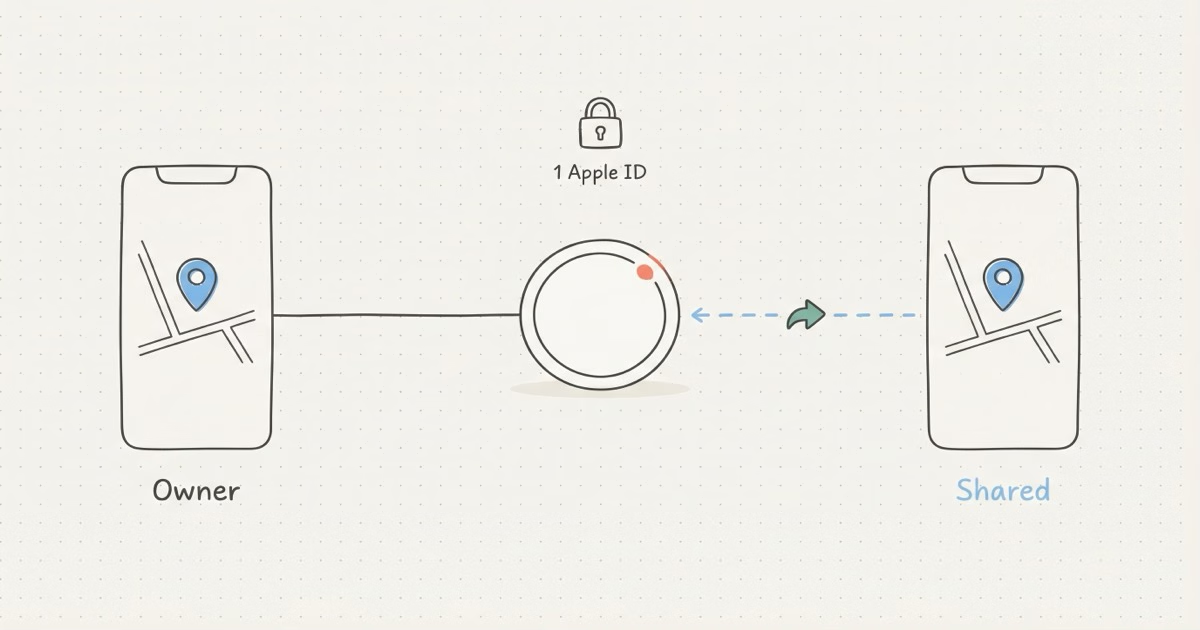
No, an AirTag can only be paired to one Apple ID at a time. But since iOS 17, the owner can share the AirTag with up to 5 other people through Find My. Borrowers see the same location data on their own iPhones. It's not dual ownership, but it fixes the biggest complaint families had about AirTags.
This question pops up constantly on Apple Community forums, and the confusion makes sense. People buy a 4-pack of AirTags, toss one on the shared car keys, and realize only one person can actually track them. Before September 2023, the honest answer was just "no." Now there's a sharing feature that changes things, though it has limits most articles skip over.
An AirTag Pairs to One Apple ID Only
Hard rule. When you hold an AirTag near your iPhone and tap Connect, it gets cryptographically bound to your Apple ID. The Find My network encrypts location data end-to-end so only your account can decrypt it. No second Apple ID can break into that encryption.
Apple built it this way for privacy reasons. If anyone could add themselves to your AirTag, stalking would be trivially easy. The single-owner design creates a clear chain of accountability: one AirTag, one owner, one person responsible for how it's used. Apple's safety documentation explains the anti-stalking reasoning in detail.
So if you're wondering whether two phones on different Apple IDs can both own the same AirTag at once, the answer is still no. That hasn't changed since AirTags launched in 2021.
Same Apple ID on Multiple Devices
There's one exception. If two iPhones are signed into the same Apple ID, both can see all AirTags on that account in Find My. That's not really "connecting to two phones" the way most people mean it, but it works for couples who share an Apple ID (though Apple recommends against that for iMessage and privacy reasons).
iOS 17 Changed Everything: Share Your AirTag With Up to 5 People
In September 2023, Apple shipped iOS 17 with a feature people had requested since day one: AirTag sharing. The owner can now invite up to 5 other people to track the same AirTag from their own iPhones, using their own Apple IDs.
That's a big deal. A family of six can all see the shared car keys on one AirTag. A couple can both track a pet's collar without buying two trackers. Roommates can keep tabs on the apartment keys. For the full setup walkthrough, see our guide to sharing AirTags with family.
How to Share an AirTag (Step by Step)
The whole process takes about 30 seconds:
- Open Find My on your iPhone (you must be the AirTag owner)
- Tap Items, then tap the AirTag you want to share
- Scroll down and tap Add Person under "Share This AirTag"
- Enter the other person's Apple ID email or phone number
- They'll get a notification on their iPhone to accept
- Once accepted, the AirTag appears in their Find My under your name
Done. Both of you can now see the AirTag's location, play a sound to find it, and get directions to it. Apple documents the process on their AirTag support page.
One thing to know: the borrower's experience looks a bit different from the owner's. Shared AirTags show up in a separate section of Find My labeled with the owner's name. The borrower can tap the AirTag to see its location on a map, play a sound, or get walking directions, but they won't see the settings or configuration options the owner sees. Think of it like a shared Google Calendar. Read access, not write access.
Requirements
Both owner and borrower need iOS 17+, an Apple ID with two-factor authentication, iCloud with Keychain turned on, and a non-child account. iPadOS 17 and macOS 14 Sonoma also work.
The child account limit frustrates parents. If your kid has a managed Apple ID through Screen Time, sharing won't work until they turn 13. Multiple threads on Apple Community confirm this.
Pairing vs. Sharing: What Borrowers Can and Can't Do
This distinction matters more than most articles let on. The owner and borrowers don't have equal access. Here's what each side gets:
| Action | Owner | Borrower |
|---|---|---|
| See AirTag location | ✓ Yes | ✓ Yes |
| Play sound to find it | ✓ Yes | ✓ Yes |
| Get directions to AirTag | ✓ Yes | ✓ Yes |
| Use Precision Finding (UWB) | ✓ Yes | ✓ Yes |
| Enable Lost Mode | ✓ Yes | ✗ No |
| Rename the AirTag | ✓ Yes | ✗ No |
| Remove the AirTag from Find My | ✓ Yes | ✗ No |
| Revoke other borrowers | ✓ Yes | ✗ No |
| Stop being a borrower | N/A | ✓ Yes |
Bottom line here: borrowers can locate the AirTag but can't control it. Only the owner manages Lost Mode, naming, and access.
For most families, that's plenty. You're sharing the car keys or a pet's collar, and all you really need is to see where it is. Borrower-level access handles that just fine. The owner keeps full control, borrowers get location data, everybody wins. For more about how Lost Mode works with shared AirTags, check our dedicated guide.
What About Buying a Used AirTag?
Used AirTags are a minefield. If the previous owner didn't remove the AirTag from their Apple ID before selling it, you can't pair it to yours. Full stop. You'll see an error during setup saying the AirTag is linked to another account.
Your options:
- Ask the seller to remove it first. They open Find My, tap the AirTag, and select Remove Item. Takes 10 seconds.
- If the seller is unreachable, you can try a factory reset: press down on the battery cover, rotate counterclockwise, remove the battery, reinsert it, and press down until you hear a sound. Repeat the battery removal five times total until you hear a different tone on the fifth insertion.
- If it still won't pair, contact Apple Support. They can sometimes remove the Activation Lock remotely, but you'll need proof of purchase.
This comes up constantly on eBay and Facebook Marketplace. A surprising number of sellers don't realize they need to unpair first, or they've already factory-reset their phone and forgotten the AirTag is still tied to their account. Apple's support page on locked items covers the official removal process. Our AirTag change owner guide walks through every scenario step by step, including what to do when the seller ghosts you.
Honestly? Buy new. The AirTag 2 is $29. The hassle of troubleshooting a locked used AirTag isn't worth the $10 you'd save.
When Sharing Isn't Enough: Alternative Approaches
The iOS 17 sharing feature covers most family use cases. But sometimes it falls short.
Android Users in the Family
If someone in your household uses Android, they can't participate in AirTag sharing. Borrowers need an iPhone running iOS 17+. No workaround, no web interface, no Android app that taps into Find My sharing.
For mixed-platform families, the smart move is a dual-network tracker. The Pebblebee Clip 5 works with both Apple Find My and Google Find Hub, so an iPhone user and a Galaxy user can each track it through their native app. Chipolo Pop offers the same dual-network setup. Either one solves the cross-platform problem that AirTag simply can't. For a broader comparison, see our best item tracker roundup.
More Than 5 People Need Access
The 5-borrower cap is firm. For office settings or large households, two AirTags on the same item (each shared with a different group) is the workaround. Not elegant, but it works.
You Need Full Control From Both Accounts
Borrowers can't enable Lost Mode or remove the AirTag. If both people need full ownership-level control, the only option is two separate AirTags on the item, each paired to a different Apple ID. The 4-pack at $99 makes this less painful at about $25 per tag.
How AirTag Sharing Compares to Competitors
Apple was actually late to the sharing party. Tile, Samsung, and Chipolo all let multiple users track the same device before Apple caught up in iOS 17.
Tile has had sharing since 2019. Any Tile owner can invite others to see a specific tracker, no premium subscription required for basic sharing. The catch? Tile's network is a fraction of Find My's size. In a dense city, that might not matter. In a suburb or rural area, it means slower updates and bigger gaps in coverage. Our AirTag vs Tile comparison breaks down the network difference in detail.
Samsung SmartTag 2 lets you share through SmartThings Family. If your household runs Samsung Galaxy phones, this works well. The SmartThings Find network has grown significantly since 2024 with hundreds of millions of Galaxy devices acting as relays. Our AirTag vs SmartTag comparison covers the full picture. For Apple families, though, SmartTag doesn't make sense.
Chipolo Pop runs on both networks at the same time. Same 5-person Find My limit applies.
Apple's sharing feature caught up, and the Find My network (over a billion devices) still offers the best coverage for iPhone households. If everyone in your family uses iPhone, stick with AirTag. Mixed households should look at Pebblebee or Chipolo Pop for cross-platform tracking. For more options, see our AirTag alternatives roundup.
The Bottom Line
An AirTag can't be paired to two phones. But since iOS 17, it can be shared with up to 5 other people, and that covers what most families actually need. Open Find My, tap your AirTag, add the people you trust, and everyone sees the same location. If you're buying a used AirTag, make sure it's been removed from the seller's account first. And if someone in your household uses Android, an AirTag won't work for them as a borrower.
Frequently Asked Questions
Can two iPhones track the same AirTag?
Yes, as long as the owner shares the AirTag with the second person through Find My (requires iOS 17+). The second person becomes a borrower who can see the location and play a sound, but can't enable Lost Mode or rename the AirTag. Before iOS 17, this wasn't possible at all.
Does Family Sharing automatically share AirTags?
No. Family Sharing handles App Store purchases, iCloud storage, and subscriptions. AirTag access is completely separate. You have to manually share each AirTag through Find My by tapping Add Person on that specific AirTag. Being in the same Family Sharing group gives you zero automatic visibility into another member's tracked items.
Can I share an AirTag with my child's account?
Not if the child is under 13. Apple blocks sharing with managed child accounts created through Family Sharing. Once they turn 13 and get a standard Apple ID, it works.
What happens if the owner removes a shared AirTag?
All borrowers lose access immediately. The AirTag disappears from everyone's Find My app with no warning. If the owner unpairs the AirTag from their Apple ID entirely, it becomes available for a brand-new owner to set up. Borrowers can't prevent or delay this. Apple designed it so the owner always has final say, which matters in situations like separation or changing living arrangements where one party needs to cut off access quickly.
Can a borrower see the AirTag's location history?
No. Find My only shows the current or last known location plus a timestamp. Apple doesn't store a movement trail. This applies to both owners and borrowers. For more on what location data Apple does and doesn't keep, see our AirTag location history explainer.
How do I stop sharing an AirTag with someone?
Open Find My, tap Items, select the AirTag, scroll to the person's name, and tap Remove. Done. They lose access instantly.
Will a shared AirTag trigger unwanted tracking alerts on the borrower's phone?
No. Apple's anti-stalking system recognizes borrowers as authorized users, so they won't get "AirTag Found Moving With You" alerts for that specific AirTag. This was a critical design decision for the sharing feature. Without it, every borrower carrying shared car keys would get daily stalking warnings, and the feature would be useless. Unshared AirTags from strangers still trigger alerts normally, so the safety system stays intact.
Can I share an AirTag with someone who uses Android?
No. iOS 17 or later is required. Android users can't be borrowers. For mixed households, look at the Samsung SmartTag 2 or Pebblebee Clip 5.