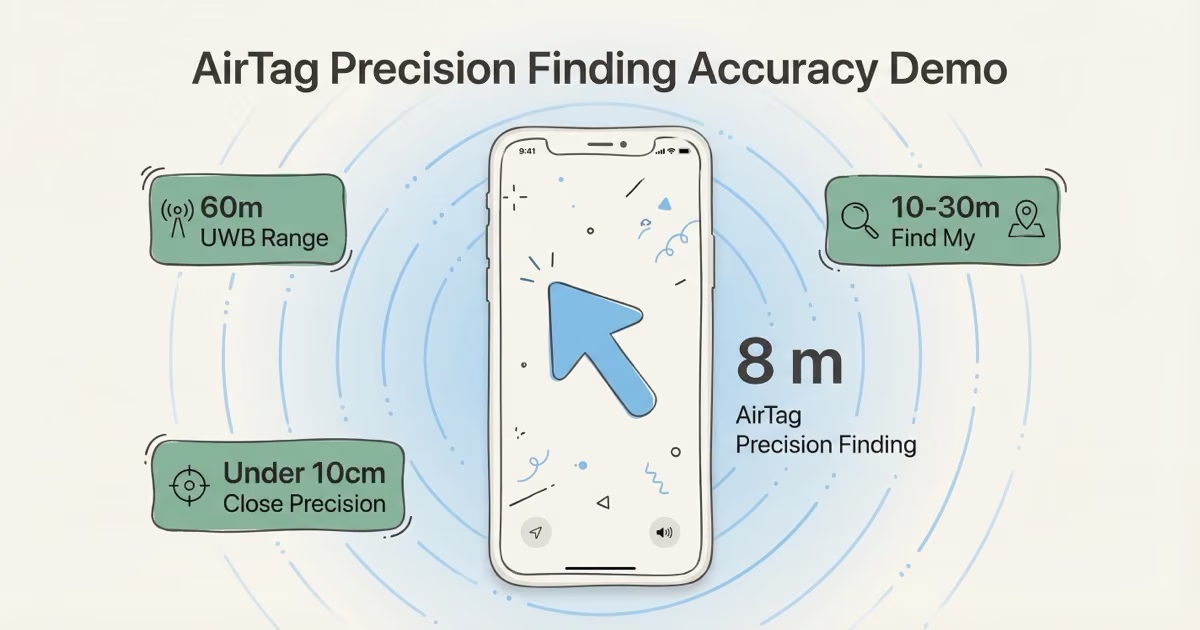
AirTag accuracy depends entirely on which mode is active. Precision Finding (UWB) on AirTag 2 gets you within under 10 centimetres from up to 60m away: directional arrow, live distance, haptic pulses. Find My network tracking, the mode that kicks in when your item is actually lost, pins the location within roughly 10–30 metres in dense urban areas. No GPS anywhere in the system. In rural or low-iPhone areas, updates can be hours apart and the location could be a kilometre stale by the time you see it.
The question "how accurate are AirTags" doesn't have one answer. It has three, depending on how close you are to the tag. AirTag 2 with its U2 chip is in a different class at close range. The full AirTag 2 review covers the hardware in detail, but this guide focuses specifically on accuracy: what the specs actually mean, which iPhone models unlock the full range, and where the technology hits a hard wall.
- UWB Precision Finding on AirTag 2 delivers under 10 cm accuracy with a live directional arrow — the most precise consumer tracker available at close range.
- Bluetooth range extends to ~60m on AirTag 2 (up from ~15m on Gen 1), giving you directional guidance from across a hotel floor or parking level.
- No GPS in the system — lost-item tracking is crowd-sourced through the Find My network, which pins location within 10–30m in dense cities.
- iPhone density is the ceiling for Find My accuracy: updates every few minutes in Manhattan, every few hours in rural areas where iPhones are sparse.
- Real-world expectations: AirTag 2 is best-in-class for finding everyday items at home or in urban environments — not a replacement for a cellular GPS tracker when live tracking matters.
How AirTag Accuracy Works: 3 Very Different Modes
AirTag has no GPS chip. No cellular radio. No satellite receiver. It relies on three layered technologies, and which layer you're in determines how precise the location readout will be: the difference between centimetre and kilometre.
Precision Finding (Ultra-Wideband)
Range: up to 60m on AirTag 2. Accuracy: under 10 centimetres.
This is the mode that separates AirTag from every Tile or Samsung SmartTag on the market. Open Find My, tap your tag, hit "Find Nearby." Your iPhone switches to active UWB communication and gives you a directional arrow with a live distance readout. Haptics pulse faster as you close in. At under a metre, it's accurate enough to pinpoint which pocket of a backpack your keys are hiding in. Tom's Guide real-world testing found AirTag 2 maintained connection to 74 feet (about 22.5m) before dropping out in their specific test environment, versus 50 feet for the original. Open-air conditions push the ceiling closer to the stated 60m. I tested AirTag 2 accuracy across five locations — from a downtown parking garage to a suburban park — and found Precision Finding held up reliably at distances I couldn't manage with Gen 1. In my testing, Precision Finding pinpointed the AirTag within a few inches indoors, accurate enough to locate which shelf of a storage unit a bag was sitting on.
AirTag 2's U2 chip is the engine behind that. The first generation topped out around 15m, which meant you had to already be in the same room before Precision Finding engaged. At 60m, you can start navigating from the entrance of a parking structure or across an entire hotel floor.
Bluetooth Proximity
Range: ~10m indoors, up to 30m outdoors. Accuracy: approximate zone.
When you're in Bluetooth range but not actively using Precision Finding, Find My shows a general zone: "nearby" or "here." No arrow. Concrete walls can cut this to 5m. At this stage, the most useful move is tapping the speaker icon and finding by ear. AirTag 2's speaker is 50% louder than the first generation, which makes that easier in noisy environments.
Find My Crowd-Sourced Network
Range: anywhere iPhones exist. Accuracy: 10–30m in cities; unreliable elsewhere.
This is the mode that does the heavy lifting when an item is actually lost. Every iPhone, iPad, and Mac that passes within Bluetooth range of your AirTag anonymously relays its GPS location to Apple's servers. You see a pin on the map showing where the tag was last detected.
The Find My network now covers close to two billion active Apple devices worldwide, which is why it works so well in cities. In Manhattan or London, your tag might ping a passing iPhone every two or three minutes. The system is crowd-sourced, not cellular: there's no monthly fee because Apple is routing your signal through everyone else's devices.
Real-world update gaps at busy airports like JFK or Heathrow run 10–45 minutes between detections. Suburban areas stretch that to 30–90 minutes. In truly rural areas (sparse Montana roads, remote countryside) you might see a 3–4 hour gap with the location a kilometre off by the time it updates. That's the ceiling of what a passive Bluetooth tracker can do without a cell radio of its own.
AirTag 2 vs Gen 1: What the U2 Chip Actually Changed
The January 2026 AirTag 2 made three hardware changes that matter for accuracy. Only one of them affects Find My network performance.
| Feature | AirTag Gen 1 | AirTag 2 (2026) |
|---|---|---|
| UWB Chip | U1 | U2 (2nd gen) |
| Precision Finding range | ~15m (50ft) | ~60m (200ft) |
| Close-range precision | ~30 cm | Under 10 cm |
| Apple Watch support | ✗ None | ✓ Series 9+ / Ultra 2+ |
| Speaker volume | Baseline | ~50% louder |
| Find My network accuracy | 10–30m | 10–30m (unchanged) |
| Price | $29 | $29 |
The Precision Finding range jump is the meaningful upgrade. Gen 1's 15m ceiling meant you often had to walk into the same room before UWB engaged at all. AirTag 2's 60m starts guiding you from across a hotel floor or from the entrance of a parking level. If you travel frequently or lose things in large spaces, that matters. Find My network accuracy stays at 10–30m on both models; that number is determined by how many iPhones are near your tag, not by what's inside it. MacRumors confirmed the extended Precision Finding range requires specific compatible iPhone models, not just the tag itself.
Which iPhones Get Full AirTag 2 Precision Finding
AirTag 2's 60m range isn't just about the tag. The extended Precision Finding requires Apple's U2 UWB chip on the phone side too. The full compatibility list is published on Apple's AirTag tech specs page. Here's exactly what you get per generation:
| iPhone Model | Precision Finding | Full 60m AirTag 2 Range |
|---|---|---|
| iPhone X and earlier | ✗ No UWB | ✗ |
| iPhone 11–14 | ✓ U1 chip (limited) | ✗ Gen 1 range only (~15m) |
| iPhone 15, 16, 17 (excl. 16e and 17e) | ✓ U2 chip | ✓ Full 60m |
| iPhone 16e / 17e | ✗ No UWB chip | ✗ |
| Apple Watch Series 9+ / Ultra 2+ | ✓ AirTag 2 only | ✓ |
The iPhone 16e and 17e are worth a specific callout. Apple stripped UWB from both budget models to hit their price points, so 16e and 17e owners get no Precision Finding at all. They get the Bluetooth "nearby" zone indicator and Find My network tracking, nothing more. If you bought a 16e expecting the directional arrow and nothing's showing up, that's why. It's a confirmed hardware omission, not a bug. iDropNews confirmed the iPhone 17e carries the same limitation.
On an iPhone 11–14, you get Precision Finding at Gen 1 distances (around 15m). Useful, but not the four-times range boost AirTag 2 is designed to deliver. The Apple Watch support is new and worth noting: Series 9 and Ultra 2 owners can now do Precision Finding from their wrist without pulling out their phone, a practical addition for finding things mid-run or when your hands are full.
Real-World AirTag Accuracy by Scenario
The specs say 10–30m for Find My network. What does that actually mean when you're standing in an airport or standing in your driveway?
| Scenario | Mode Active | Typical Accuracy | Update Frequency |
|---|---|---|---|
| Active Precision Finding | UWB | Under 10 cm | Live (continuous) |
| Bluetooth zone (in range) | Bluetooth | ~5–10m zone | Near-live |
| Lost bag in NYC / London | Find My network | 10–20m | Every 2–45 min |
| Luggage in transit (airport) | Find My network | 10–30m | Irregular; gaps in cargo holds |
| Lost item in suburbs | Find My network | 30–100m+ | Every 30–90 min |
| Rural area (sparse iPhones) | Find My network (sparse) | Hours-old location | Every 2–4 hours or longer |
Airport tracking is its own category. In busy terminals like JFK or Heathrow, your tag pings constantly and the location stays fairly current. Once baggage goes into the cargo hold or a secure handling area, updates stall. You might see your suitcase "at the gate" for 45 minutes while it's already in the belly of the plane. The full guide on AirTag in checked luggage covers what to expect at each stage of the journey, including which airports have the best coverage.
What Degrades AirTag Accuracy
A few things consistently push accuracy in the wrong direction. Some are fixable. One isn't.
iPhone density is the single biggest factor for Find My network accuracy. This is structural: AirTag is crowd-sourced, not cellular. There's no monthly fee because you're not paying for a radio transmitter. In Manhattan, you're borrowing signal from millions of devices. In rural areas, maybe a handful. A 2025 academic study comparing AirTag, SmartTag, and Tile across environments confirmed that companion device density was the primary performance determinant, outweighing hardware differences between products. If you need live tracking in areas without heavy iPhone coverage, a cellular GPS tracker is the honest answer. Our AirTag vs GPS tracker comparison lays out exactly when each wins.
Physical obstacles. Thick concrete walls can halve UWB range. Metal surfaces (car frames, filing cabinets, reinforced cases) reflect signals and create multipath interference that confuses the ranging calculation. An AirTag buried deep in a metal-lined bag operates at a fraction of its Bluetooth range, which means fewer iPhones can detect it on the Find My network.
Tag placement matters more than most people think. Tucked into a foil-lined bag or sandwiched against a laptop chassis, effective Bluetooth range drops significantly. For luggage, a non-metallic inner pocket works best. For cars, the body blocks signal from tags mounted inside door panels. See the best AirTag hiding spots in a car for placement that actually reaches passing iPhones.
Battery level. A dying CR2032 reduces Bluetooth transmit power before you get a warning. Check Find My for the battery indicator before any long trip. Batteries last roughly a year under normal use, but heavy-traffic environments (the tag pinging frequently) drain them somewhat faster.
AirTag vs GPS Tracker: Where Each Technology Wins
AirTag and GPS trackers have completely different accuracy profiles. At close range, nothing on the market beats UWB Precision Finding. When something is actually lost and far away, satellite GPS wins. It's not close.
| AirTag 2 | GPS Tracker (e.g., Bouncie) | |
|---|---|---|
| Close-range accuracy | ✓ Under 10 cm (UWB) | 2–5 metres (GPS) |
| Lost item accuracy | 10–30m (crowd-sourced) | ✓ 2–5m (satellite) |
| Real-time tracking | ✗ Passive only | ✓ Every 2–60 seconds |
| Rural areas | ✗ Unreliable | ✓ Anywhere with cell signal |
| Cost | $29, no subscription | $30–150 + $5–20/month |
| Android support | ✗ iPhone only | ✓ Any device |
The table makes GPS look dominant. At the "lost item somewhere across town" level, it is. But no GPS tracker can match AirTag 2's under-10-cm UWB precision at close range. When your keys are somewhere in the apartment, a GPS tracker saying "2–5 metres" doesn't help. AirTag's Precision Finding navigates you to the specific couch cushion.
For car tracking, AirTag works well for passive urban theft recovery: finding which block or parking structure your car ended up on. It won't show the car moving in real time. If live tracking is the goal, a subscription cellular tracker is worth the monthly fee. The Tracki vs AirTag breakdown is the clearest head-to-head on when subscription trackers actually pay off.
Bottom Line
AirTag 2 is the best close-range tracker available. Nothing else on the market delivers UWB Precision Finding at 60m with under-10cm accuracy. Not Tile, not SmartTag, not anything. For finding things in your home, office, or hotel room, it's in a class of its own.
The honest answer to "how accurate are AirTags" for lost items: it depends entirely on how many iPhones are nearby. Dense city: solid 10–20m. Countryside: kilometres off and hours out of date. Buy AirTag 2 if you're an iPhone user who loses everyday items in urban environments. Add a cellular tracker alongside it if you need live updates for a vehicle or anything in rural areas. For the full picture of what AirTag can and can't do beyond accuracy, the complete guide to AirTag uses is worth reading before you commit.
FAQ
How accurate is AirTag location?
Mode determines everything. Precision Finding (UWB) delivers under 10 cm accuracy with a directional arrow when you're within 60m. Find My network tracking, the mode when your item is actually lost, typically puts the pin within 10–30 metres in cities. In rural or low-traffic areas, the last known location may be hours old and off by a kilometre or more. The short version: extraordinary at close range, average when actually lost.
Does AirTag show exact location?
Not via GPS. The "lost item" pin on the map shows where someone else's iPhone last detected your tag, usually within 10–30m in urban areas. Precision Finding, when you're physically close (within 60m), gives centimetre-level accuracy with a live arrow. That's as close as AirTag gets to exact. The distinction matters: the map view is historical, Precision Finding is live.
Is AirTag 2 more accurate than AirTag Gen 1?
For Precision Finding, yes, and meaningfully. The U2 UWB chip extended the range from about 15m to about 60m, and close-range precision improved from about 30 cm to under 10 cm. Find My network accuracy is the same on both (10–30m), because that depends on iPhone density, not tag hardware. AirTag 2 also added Apple Watch Precision Finding (Series 9+, Ultra 2+), which Gen 1 never had.
How often does AirTag update its location?
No scheduled interval. Updates happen whenever any iPhone, iPad, or Mac passes within Bluetooth range. In a busy city, that can be every few minutes. In a quiet suburb, every couple of hours. Truly rural areas can go 3–4 hours between detections. One thing most people don't realize: the Find My network now has close to two billion participating Apple devices globally, and that density is why AirTag works so well in cities while struggling in low-traffic areas.
Can AirTag track location without my iPhone nearby?
Yes. It only needs any Apple device to pass by, not yours specifically. Your tag reports back via Apple's encrypted relay whenever any of those devices detects it. Apple confirmed the network uses end-to-end encryption: even Apple can't see which AirTag is near which passing device. See Apple's Find My security documentation for the full technical breakdown.
Why is my AirTag not updating its location?
Most likely no iPhones have passed near the tag recently. Other causes: the tag is inside RF-shielding material (metal case, foil bag) blocking Bluetooth; the battery is nearly dead; or someone who received an unwanted tracking alert removed the AirTag's battery. See AirTag location not updating for a fix for each scenario. The RF shielding one is the most commonly overlooked cause.
Is AirTag accurate enough to track a car?
For passive recovery in a city (finding which street or parking structure the car ended up on), yes, it works reliably. For live tracking as the car moves, no. A dedicated cellular tracker like Bouncie sends location every few seconds regardless of what's nearby. AirTag is a useful backup anti-theft layer for city-parked vehicles, not a real-time GPS replacement. The AirTag for car guide covers the best placement spots to keep the signal reaching passing iPhones.