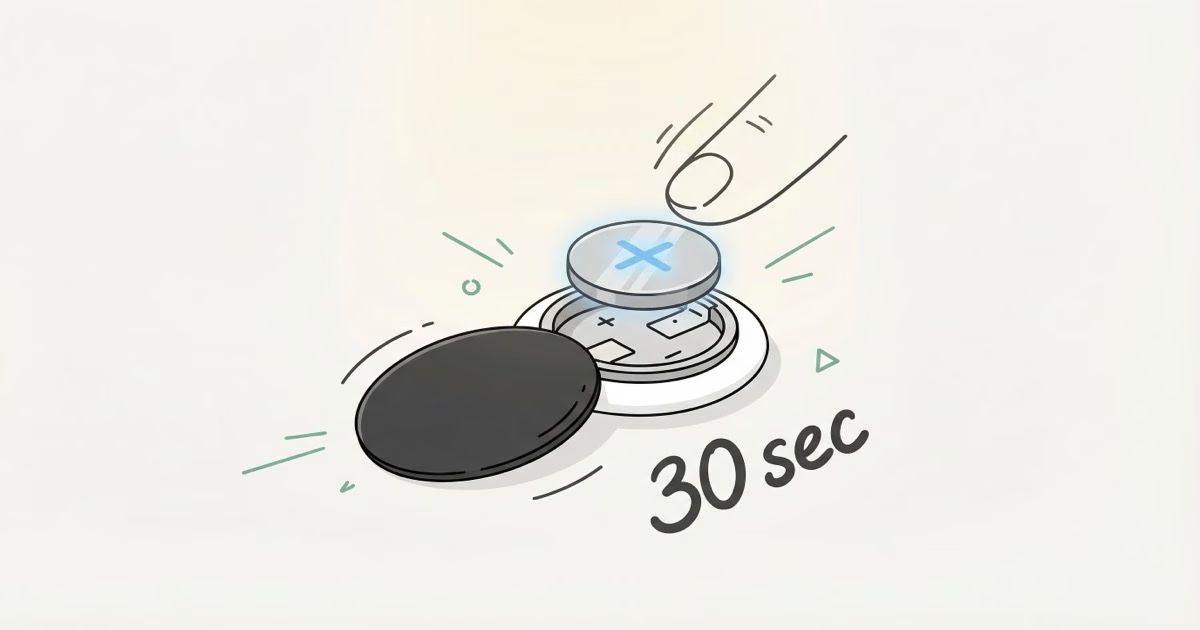
Your AirTag's battery lasts about a year. When Find My finally shows that low battery warning, you don't need to buy a new tracker or visit an Apple Store. A $2 coin battery and 30 seconds of your time is all it takes. Both the original AirTag and the AirTag 2 use the same CR2032 cell and the same twist-off back cover, so these steps work for every AirTag Apple has ever sold.
- AirTags use a standard CR2032 lithium 3V coin cell — available at any pharmacy or online for $1–2 each.
- Both the original AirTag and AirTag 2 use the same CR2032 and the same twist-off stainless steel back — the replacement process is identical for both generations.
- The swap takes 30 seconds: twist counterclockwise, lift the cover, drop in the new battery positive side up, twist clockwise until it clicks.
- Avoid Duracell CR2032 batteries — their bitter coating frequently blocks electrical contact and triggers an "Accessory not supported" error.
- A CR2032 lasts 10–14 months in typical use; both models show a "Low Battery" alert in Find My weeks before the battery actually dies.
Step-by-Step: How to Replace AirTag Battery
Press down and twist counterclockwise. That's the entire concept. But here's the detailed version so nothing goes wrong:
- Flip the AirTag so the white plastic side faces down. The polished stainless steel back should face you.
- Press your thumb firmly on the center of the steel back. You need downward pressure while you rotate.
- Twist counterclockwise about a quarter turn. You'll feel a slight resistance, then a stop. Don't force it past the stop point.
- Lift the back cover straight off. The CR2032 battery sits in a shallow tray underneath.
- Pop out the old battery. It lifts right out with a fingernail.
- Drop in the new CR2032 with the positive (+) side up. The smooth, flat side faces you. The side with text printed on it goes down into the tray.
- Align the three tabs on the cover with the three slots on the AirTag body, press down, and rotate clockwise until it clicks.
- Listen for the chime. A short tone confirms the battery is seated and recognized. No chime? Remove the battery and reinsert it.
That's it. No re-pairing needed, no setup screens, no app involvement. Your AirTag reconnects to your Apple ID automatically and shows up in Find My within seconds. Apple's official support page confirms this process works identically for both generations.
I've replaced the battery in my AirTag three times over the past two years — twice on the original model and once on the AirTag 2 after it launched. The twist-and-pop motion took me about 10 seconds once I got the hang of it; the only step that slowed me down the first time was remembering to press down firmly while rotating. Skipping that downward pressure is why a lot of people think the back is stuck.
Which CR2032 Battery Works Best
Buy Energizer, Panasonic, or Sony. These three brands consistently work without issues in AirTags. The battery itself is a standard CR2032 lithium 3V coin cell, available at pharmacies, supermarkets, gas stations, and online for about $1-2 per battery in multi-packs.
Here's the catch that trips people up. Some CR2032 manufacturers apply a bitter-tasting coating to the positive terminal so kids won't swallow them. Reasonable safety feature, terrible for AirTag owners. That coating blocks the electrical contact inside the AirTag and triggers an "Accessory not supported" error in iOS.
Duracell is the biggest culprit. Their CR2032 batteries frequently have the bitterant coating, and Apple Community forums are packed with posts from people whose AirTag stopped working after a Duracell swap. Some newer Duracell packaging says "Compatible with Apple AirTag," but user reports on TidBITS and Apple's own forums tell a different story. I'd skip Duracell entirely for AirTags.
Just grab an Energizer CR2032 6-pack for around $8. That covers all your AirTags for the next several years. Toss the spares in a drawer and you won't have to make a last-minute pharmacy run.
Quick note on storage: CR2032 cells have a shelf life of about 8-10 years at room temperature, so buying in bulk makes sense. Keep them away from extreme heat and loose change. Two CR2032 cells touching each other can slowly discharge, which is easy to avoid with the original packaging.
AirTag 2 vs. Original AirTag: Battery Differences
Same battery, same swap process, slightly different reset procedure. The AirTag 2 launched in January 2026 with upgraded internals, but Apple kept the CR2032 battery and the twist-off back cover unchanged. If you've replaced a battery on the original AirTag, you already know how to do it on the AirTag 2.
The AirTag 2 does pack a 50% louder speaker and Apple's second-generation Ultra Wideband chip with 1.5x the Precision Finding range, per Apple's tech specs. Both upgrades draw more power in theory. In practice? Apple still quotes "more than a year" of battery life for both models, and real-world reports back that up.
Where they actually differ is the factory reset. The AirTag 2 requires you to remove the battery, wait five seconds, reinsert it, and repeat that cycle four times. The original skipped the five-second pause. You'll only run into this if you're troubleshooting signal issues or giving the AirTag to someone else. For a plain battery replacement, the process is identical.
Troubleshooting: New Battery Not Working
Check orientation first. Positive (+) side up. This trips up more people than you'd expect because both sides of a CR2032 look almost identical. The smooth, flat side goes up. Text printed on it? That side goes down.
If orientation is correct and the AirTag still doesn't chime:
- Bitterant coating fix: Wipe the positive terminal of the battery with a dry cloth or a cotton swab dipped in rubbing alcohol. This removes enough of the coating to restore contact. Some users on Apple Community forums report that light rubbing with fine steel wool for 20-30 seconds also works.
- Try a different brand. If you're using Duracell and getting the "Accessory not supported" warning, switch to Energizer or Panasonic. Don't waste time troubleshooting a coated battery.
- Check the back cover. The cover must click fully into the locked position. A partially seated cover breaks the circuit. Press down firmly while rotating clockwise.
- Inspect for corrosion. If your AirTag was exposed to moisture or the old battery leaked, clean the contacts inside the tray with a dry cotton swab. Green or white residue on the contacts means corrosion.
- Test with a known-good battery. CR2032 batteries can arrive dead from the factory, especially in cheap multi-packs. If you have another battery from a different source, try it.
Tried everything above and still nothing? The AirTag itself might be dead. Our full troubleshooting guide covers more fixes, or you can contact Apple Support directly.
When to Replace vs. When to Buy New
Replace the battery. Almost always. There's no rechargeable cell wearing out, no screen degrading, no moving parts to fail. An AirTag can easily last 5-10 years. The only thing you'll ever replace is a $2 coin cell.
Do the math. A new AirTag 2 four-pack costs $99. A CR2032 battery? Under $2. Five AirTags with annual battery swaps comes to about $10 per year total. That's it. The whole running cost of Apple's tracking ecosystem, since there's no monthly subscription.
Buy new only if your AirTag is physically damaged, corroded beyond cleaning, or if you want to upgrade from the original to the AirTag 2 for the improved Precision Finding range. Some people with a collection of AirTag holders and accessories also use a battery swap as an excuse to rotate their setup. Fair enough.
Water damage is the gray area. AirTags carry an IP67 rating, good for 30 minutes submerged in a meter of water. But that assumes the back cover is fully sealed. If you swapped the battery and didn't lock the cover all the way, moisture creeps in over time. A corroded AirTag that won't hold a charge after cleaning the contacts? That's the one case where buying a replacement beats fighting it. A fresh AirTag 2 costs $29 with a new battery already installed.
How to Check Your AirTag Battery Level
Open Find My, tap Items, then tap the specific AirTag. If the battery is getting low, you'll see a "Low Battery" indicator under the AirTag's name. Apple removed the continuous battery percentage display back in iOS 16.1, so you won't see an exact number anymore.
You will get a push notification on your iPhone when the battery drops below Apple's threshold. Most people report several weeks of warning between the first low battery alert and actual failure. No need to panic. Order a replacement battery when you see the notification and swap it within a week or two.
Here's what I do: replace all my AirTag batteries on the same day once a year. Pick a date you'll remember. January 1st. Daylight saving time. Whatever sticks. It takes 30 seconds per AirTag, and you stop wondering which ones are due. Five AirTags, five batteries, under three minutes. Done for the year. If you're still figuring out where to put all those trackers, check out our list of the best uses.
Don't wait for the battery to die completely. A dead AirTag goes silent and stops updating its location in the Find My network. That tends to happen at the worst possible time. Swap the battery at the first notification and you won't lose tracking coverage.
The Bottom Line
Replacing an AirTag battery is about as simple as tech maintenance gets. Twist, swap, twist back. Thirty seconds, two dollars, done for another year. Stick with Energizer or Panasonic CR2032 batteries, skip Duracell, and don't overthink it. If you're thinking about buying a new AirTag just because the battery died, save your money. A fresh CR2032 brings it right back to life.
Frequently Asked Questions
How do you replace an AirTag battery?
Press down on the stainless steel back and twist counterclockwise until it stops. Lift off the cover, swap the old CR2032 for a new one with the positive (+) side facing up, then replace the cover and twist clockwise to lock. The AirTag chimes to confirm. No tools needed, no re-pairing required. The whole process is faster than reading this paragraph.
What battery does an AirTag use?
A CR2032 lithium 3V coin cell. You can find them at any pharmacy, grocery store, or on Amazon. Both the original AirTag and AirTag 2 take the same battery. Stick with Energizer, Panasonic, or Sony. Some brands apply a bitter coating to the positive terminal that blocks the AirTag's internal contacts.
Why won't my AirTag work after replacing the battery?
The battery is probably upside down or has a bitterant coating. Flip it so the smooth, flat positive side faces up. If that doesn't work, wipe the positive terminal with rubbing alcohol to remove any coating residue. Still no chime? Try a battery from a different brand entirely. MacRumors notes that the AirTag 2 reset procedure requires removing and reinserting the battery four times with five-second pauses, which is different from a simple battery swap.
How long does an AirTag battery last?
About one year. Apple says "more than a year" for both models, and real-world results land between 10 and 14 months. Heavy use of Play Sound and Precision Finding drains it faster, as does cold weather. Pop in a fresh CR2032 and you're back to full performance instantly.
Does replacing the battery reset my AirTag?
No. Your AirTag stays paired to your Apple ID through the swap. No setup screens, no re-pairing. It picks up right where it left off. A full reset is a separate procedure that requires removing and reinserting the battery multiple times.
Can I use rechargeable CR2032 batteries in an AirTag?
You can, but I wouldn't. Rechargeable cells (usually labeled LIR2032) output 3.6V instead of 3.0V, which falls outside Apple's specified range. Some work fine. Others cause erratic behavior or throw compatibility warnings. Standard CR2032 cells cost $1-2 and last a full year, so the savings from rechargeables just aren't worth the headache.
Is the AirTag 2 battery replacement process different?
Nope. Same twist-off back, same CR2032, same orientation. The factory reset is different: the AirTag 2 makes you wait five seconds between each battery removal cycle, and you repeat it four times. But that's only for resets. For a normal battery swap, both models work exactly the same way.
How do I know when my AirTag battery needs replacing?
Find My sends a push notification to your iPhone when the battery gets low. You can also check manually: open Find My, tap Items, then tap the AirTag. A "Low Battery" label appears under the name when it's time. You typically have several weeks between the first warning and actual failure, so there's no rush. If you're also seeing alternatives to AirTag that use rechargeable batteries, note that those require charging every few weeks instead of one annual battery swap.