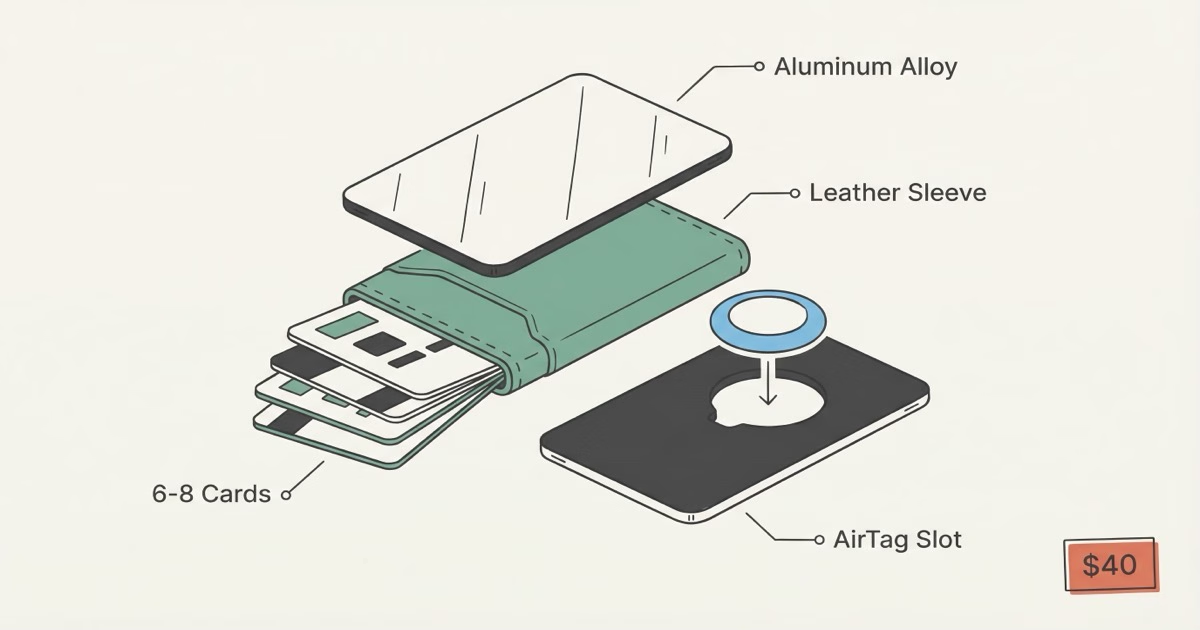
The TagsMate is the best budget AirTag wallet you can buy right now. For $40, you get a dedicated AirTag slot built into an aluminum-and-leather trifold that holds 6-8 cards comfortably, weighs 1.76 oz with an AirTag installed, and includes RFID blocking. It won't match a Ridge on finish quality, but at less than half the price with better AirTag integration, it's hard to argue against it.
I picked up the TagsMate after testing five other AirTag wallets for our best AirTag wallet roundup. Most of them treated the AirTag holder as an afterthought, just a loose pouch stitched to the back. The TagsMate actually built the slot into the frame. Three months of front-pocket carry later, here's what I found.
TagsMate Build Quality and Materials
Two aluminum alloy plates with a leather card sleeve sandwiched between them. That's the basic construction. Pick it up and you notice the rigidity first, then the edges. Cards don't bend inside, and the aluminum is smooth enough that you won't snag pocket fabric pulling it out. At this price, you'd expect rough finishing. There are minor machining marks if you look under direct light, but nothing you'd feel with your fingers.
Weight with an AirTag 2 inside: 1.76 oz. Lighter than most bifolds I've owned.
The trifold closure uses neodymium magnets embedded in the aluminum frame. Strong enough to stay shut in your pocket, easy enough to open one-handed. More importantly, the magnets sit away from the card compartment. No risk of demagnetizing hotel key cards or contactless payment cards from the closure itself. I carried two hotel key cards during a week-long work trip in Denver and both worked every single day. The magnets don't mess with the AirTag's Bluetooth signal either, which I was worried about before testing.
Stitched leather, not glued. Three months in, no delamination. No loose threads. No stretching. That surprised me at $40.
RFID Blocking
TagsMate claims RFID blocking on all models. I tested it with an NFC reader app on my phone. Cards inside the closed wallet? Unreadable. Cards outside? Instant read. The aluminum plates themselves act as the shield, which holds up better than the thin RFID-blocking fabric you see in cheaper competitors. The FTC recommends RFID-blocking wallets as one layer of identity protection, though real-world RFID skimming is still rare.
One catch: RFID protection only works when the wallet is fully closed. Open the trifold and the card sleeve is exposed, making cards readable again. Every aluminum RFID wallet works this way, not just the TagsMate, but keep it in mind if you leave your wallet open on a desk.
What About the Carbon Fiber Model?
TagsMate sells a carbon fiber variant (CFRP) for about $10 more. Slightly lighter, same card capacity, identical AirTag slot. The carbon fiber version looks sharper but scratches more visibly than aluminum. Unless you specifically want the carbon fiber aesthetic, the standard aluminum model is the better value.
How the AirTag Slot Actually Works
This is what sets the TagsMate apart from every other budget wallet. The AirTag slot is a precision-cut recess in one aluminum plate, sized exactly for the 31.9mm AirTag 2. The AirTag snaps in with a friction fit -- firm enough that it doesn't rattle, loose enough to pop out with fingernail pressure when you need to swap the battery. No adhesive, no external pouch, no card slot consumed. It just sits flush inside the wallet's body, invisible from the outside.
Some Amazon reviewers report the AirTag fitting loosely over time. After three months, mine still holds. The key: push it in until you hear a small click.
Bluetooth signal quality from inside the wallet is good. One face of the AirTag compartment is open fabric (the leather sleeve side), which lets Bluetooth transmit without the aluminum blocking it. I tested Find My's Play Sound through a jacket pocket, a backpack, and from across a room. Clear signal every time. The Find My network worked exactly as expected in everyday carry, and Precision Finding on the AirTag 2 still worked at close range through the wallet's materials.
Battery swap? Under a minute. Pop the AirTag out, twist the back, swap the CR2032. Done. Apple's battery replacement guide covers the details.
Card Capacity and Everyday Carry
TagsMate rates the wallet at 6-12 cards. Here's what that looks like in practice:
- 6-8 cards: Ideal daily load. Cards slide in and out easily. Trifold closes flush. This is the sweet spot.
- 9-10 cards: Functional but tighter. Extracting a specific card from the middle takes some fumbling.
- 11-12 cards: Technically possible. Creates visible bulge at the fold. Don't buy a minimalist wallet if you need 12 cards.
Standard credit cards, debit cards, and driver's licenses fit without issues. Thick loyalty cards or badge-style access cards add noticeable bulk. One thing to flag: the wallet isn't designed for cash. You can fold a few bills behind the card sleeve or use the elastic cash strap on the back, but if you carry cash daily, this isn't the right wallet for you.
TagsMate Pros and Cons
- Built-in AirTag slot that actually holds the AirTag securely
- RFID blocking via aluminum plates (verified, not just claimed)
- $40 price undercuts Ridge by $55+ and Ekster by $30+
- Magnetic trifold closure works one-handed
- 1.76 oz with AirTag -- lighter than Ridge + AirTag Card combo
- Stitched leather sleeve, not glued
- Finish quality shows minor machining marks up close
- Cash storage is an afterthought (elastic strap only)
- No quick-eject card mechanism like Ekster's pop-up system
- Limited warranty compared to Ridge's 99-year guarantee
- AirTag slot may loosen over time per some Amazon reviews
- iPhone-only tracking (AirTag doesn't work with Android)
TagsMate vs Ridge vs Ekster: Which AirTag Wallet Should You Buy?
Buy the TagsMate if you want the best AirTag integration for the least money. Buy the Ekster if you want premium leather and a pop-up card mechanism. Skip the Ridge for AirTag use -- it requires a separate $15 AirTag Card accessory that adds bulk.
| Feature | TagsMate (~$40) | Ekster Parliament (~$90) | Ridge (~$95-120) |
|---|---|---|---|
| Native AirTag slot | ✓ Built-in | ✓ Silicone pocket | ✗ Needs $15 add-on |
| Card capacity | 6-12 | 4-10 | 1-12 |
| Card access method | Manual slide | ✓ Pop-up button | Manual slide |
| RFID blocking | ✓ Yes | ✓ Yes | ✓ Yes |
| Weight (with AirTag) | 1.76 oz | ~2.5 oz | ~2.5 oz (with AirTag Card) |
| Material | Aluminum + leather | Premium leather + aluminum | Aluminum or titanium |
| Warranty | ⚠ Limited | 2-year | ✓ 99-year |
| Price | ✓ ~$40 | ~$90 | $95-175 |
The Ekster Parliament is the better wallet overall -- nicer leather, the pop-up card mechanism is a real advantage (tap a button and your cards fan out), and the AirTag pocket is well-integrated. But it costs $50 more. The Ridge has the best build quality and a near-permanent warranty, but its AirTag solution is clunky. A separate Ridge AirTag Card sits in the card stack and takes up a card slot, which defeats the purpose of a minimalist wallet. For a deeper comparison of wallet tracking options, check our best wallet finder guide.
The TagsMate wins on value. If you'd spend $40 on a decent card holder anyway, getting a proper AirTag slot included is a no-brainer.
Who Should Buy the TagsMate Wallet
The TagsMate makes sense for a specific buyer. You're already an iPhone user. You own or plan to buy an AirTag. You want a slim front-pocket wallet. And you'd rather spend $40 than $90-120 on a wallet that does roughly the same job.
It doesn't make sense if you carry more than 8 cards daily, need serious cash storage, use Android (AirTag won't work), or want something that looks premium in a business setting. For those cases, the Ekster Parliament or a traditional leather bifold with a separate AirTag holder is a better path.
One audience that overlooks this wallet: frequent travelers. Losing a wallet abroad is a nightmare, and having an AirTag inside means Find My works internationally across billions of Apple devices. A TagsMate in your front pocket plus an AirTag in your checked bag covers both your wallet and luggage for under $70 total.
The Bottom Line
The TagsMate delivers exactly what it promises: a functional AirTag wallet for $40. The build quality is above average for the price, the AirTag slot is the best integrated design I've tested under $50, and RFID blocking works as advertised. It won't win any design awards, and the finish can't touch a Ridge or Ekster up close. But most people don't buy wallets to show off -- they buy them to hold cards and not lose them. The TagsMate does both. If you're shopping for an AirTag wallet on a budget, start here.
Frequently Asked Questions
Is the TagsMate wallet worth $40?
Yes. Compared to generic aluminum card holders at $15-25 (which have no AirTag slot), the TagsMate's build quality and integrated tracking justify the premium. Compared to Ridge ($95+) or Ekster ($90+), it's a bargain with better native AirTag integration than either. The one scenario where it's not worth it: if you already own a wallet you love and just need tracking, a $10 AirTag card sleeve is cheaper.
How many cards can the TagsMate wallet actually hold?
6-8 comfortably. That's driver's license, 2-3 credit cards, debit card, insurance card, and maybe one more. The 12-card maximum TagsMate advertises requires thin cards and creates a bulge at the fold. Most minimalist wallet users settle around 7 cards after the first week of decluttering.
Does the TagsMate magnet demagnetize credit cards?
No. The neodymium magnets are positioned in the closure mechanism, away from the card storage area. EMV chip cards are completely immune to magnets. Magnetic stripe cards would only be affected by direct, sustained contact with a strong magnet, and the TagsMate's closure magnets aren't strong enough or close enough to cause issues. Hotel key cards are the most vulnerable, but I carried two for a week without problems.
Can I track the TagsMate wallet with an Android phone?
No. AirTag requires an iPhone with iOS 14.5 or later and works exclusively through Apple's Find My network. Android users should look at the Samsung SmartTag or Tile-based wallet trackers instead. There's no workaround for this -- it's a hardware and ecosystem limitation, not a TagsMate limitation.
Does the AirTag fall out of the TagsMate wallet?
Some Amazon reviewers report a loose fit over time. In my testing, the AirTag stayed secure for three months of daily pocket carry, including a few drops onto hard floors. The trick is pressing the AirTag firmly into the slot until it clicks. If you just rest it in the recess without pressing down, it won't engage the friction fit properly.
How does the TagsMate compare to using an AirTag card insert?
An AirTag card insert (like the Elevation Lab TagVault Wallet at around $15) turns any existing wallet into an AirTag wallet by taking up a card slot. The TagsMate's advantage is that the AirTag sits in its own dedicated compartment and doesn't consume a card slot. The disadvantage is you're buying a whole new wallet. If you already have a wallet you like, the card insert is cheaper. If you're buying new, the TagsMate's integrated design is cleaner and slimmer.
Does Lost Mode work with the AirTag inside the TagsMate?
Lost Mode works identically regardless of where the AirTag is. Enable it in Find My, add your contact info, and any iPhone that passes near your lost wallet relays its location to you. The TagsMate's materials don't block the Bluetooth signal -- the open leather side of the AirTag compartment lets the signal through without degradation.
What's the best AirTag wallet if money is no object?
The Ekster Parliament AirTag edition at $90. Premium Nappa leather, patented pop-up card access, and a well-designed AirTag pocket. If you want something even more upscale, our best AirTag wallet guide covers options up to $150+. But for most people, the TagsMate at $40 gets 80% of the experience for 40% of the cost.